User Documentation
Release 1.4.0 "Jalapeno"
July 2006
Table of Contents
- Preface
- 1. Introduction
- 2. Architecture
- 3. Basic API
- 4. Clustered Caches
- 5. Transactions and Concurrency
- 6. Eviction Policies
- 7. Cache Loaders
- 8. TreeCacheMarshaller
- 9. State Transfer
- 10. Version Compatibility and Interoperability
- 11. Configuration
- 12. Management Information
- 13. Running JBoss Cache within JBoss Application Server
This and its accompanying documents describe JBoss Cache's TreeCache, a tree-structured replicated, transactional cache. JBoss Cache's PojoCache, an "object-oriented" cache that is the AOP-enabled subclass of TreeCache, allowing for Plain Old Java Objects (POJOs) to be inserted and replicated transactionally in a cluster, is described separately in a similar user guide.
The TreeCache is fully configurable. Aspects of the system such as replication mechanisms, transaction isolation levels, eviction policies, and transaction managers are all configurable. The TreeCache can be used in a standalone fashion - independent of JBoss Application Server or any other application server. PojoCache on the other hand requires both TreeCache and the JBossAOP standalone subsystem. PojoCache, documented separately, is the first in the market to provide a POJO cache functionality.
This document is meant to be a user guide to explain the architecture, api, configuration, and examples for JBoss Cache's TreeCache. Good knowledge of the Java programming language along with a string appreciation and understanding of transactions and concurrent threads is presumed. No prior knowledge of JBoss Application Server is expected or required.
If you have questions, use the user forum linked on the JBoss Cache website. We also provide a mechanism for tracking bug reports and feature requests on the JBoss JIRA issue tracker. If you are interested in the development of JBoss Cache or in translating this documentation into other languages, we'd love to hear from you. Please post a message on the user forum or contact us on the developer mailing list.
JBoss Cache is an open-source product based on LGPL. Commercial development support, production support and training for JBoss Cache is available through JBoss Inc. JBoss Cache is a product in JBoss Professional Open Source JEMS (JBoss Enterprise Middleware Suite).
A TreeCache is a tree-structured, replicated, transactional cache from JBoss Cache. TreeCache is the backbone for many fundamental JBoss Application Server clustering services, including - in certain versions - clustering JNDI, HTTP and EJB sessions, and clustering JMS.
In addition to this, TreeCache can be used as a standalone transactional and replicated cache or even an object oriented data store, may be embedded in other J2EE compliant application servers such as BEA WebLogic or IBM WebSphere, servlet containers such as Tomcat, or even in Java applications that do not run from within an application server.
The structure of a TreeCache is a tree with nodes. Each node has a name and zero or more children. A node can only have 1 parent; there is currently no support for graphs. A node can be reached by navigating from the root recursively through children, until the requested node is found. It can also be accessed by giving a fully qualified name (FQN), which consists of the concatenation of all node names from the root to the node in question.
A TreeCache can have multiple roots, allowing for a number of different trees to be present in a single cache instance. Note that a one level tree is essentially a HashMap. Each node in the tree has a map of keys and values. For a replicated cache, all keys and values have to be Serializable. Serializability is not a requirement for PojoCache, where reflection and aspect-oriented programming is used to replicate any type.
A TreeCache can be either local or replicated. Local trees exist only inside the Java VM in which they are created, whereas replicated trees propagate any changes to all other replicated trees in the same cluster. A cluster may span different hosts on a network or just different JVMs on a single host.
The first version of TreeCache was essentially a single HashMap that replicated. However, the decision was taken to go with a tree structured cache because (a) it is more flexible and efficient and (b) a tree can always be reduced to a map, thereby offering both possibilities. The efficiency argument was driven by concerns over replication overhead, and was that a value itself can be a rather sophisticated object, with aggregation pointing to other objects, or an object containing many fields. A small change in the object would therefore trigger the entire object (possibly the transitive closure over the object graph) to be serialized and propagated to the other nodes in the cluster. With a tree, only the modified nodes in the tree need to be serialized and propagated. This is not necessarily a concern for TreeCache, but is a vital requirement for PojoCache (as we will see in the separate PojoCache documentation).
When a change is made to the TreeCache, and that change is done in the context of a transaction, then we defer the replication of changes until the transaction commits successfully. All modifications are kept in a list associated with the transaction for the caller. When the transaction commits, we replicate the changes. Otherwise, (on a rollback) we simply undo the changes locally and release any locks, resulting in zero replication traffic and overhead. For example, if a caller makes 100 modifications and then rolls back the transaction, we will not replicate anything, resulting in no network traffic.
If a caller has no transaction associated with it (and isolation level is not NONE - more about this later), we will replicate right after each modification, e.g. in the above case we would send 100 messages, plus an additional message for the rollback. In this sense, running without a transaction can be thought of as analogous as running with auto-commit switched on in JDBC terminology, where each operation is committed automatically.
There is an API for plugging in different transaction managers: all it requires is to get the transaction associated with the caller's thread. Several TransactionManagerLookup implementations are provided for popular transaction managers, including a DummyTransactionManager for testing.
Finally, we use pessimistic locking of the cache by default, with optimistic locking as a configurable option. With pessimistic locking, we can configure the local locking policy corresponding to database-style transaction isolation levels, i.e., SERIALIZABLE, REPEATABLE, READ_COMMITTED, READ_UNCOMMITTED and NONE. More on transaction isolation levels will be discussed later. Note that the cluster-wide isolation level is READ-UNCOMMITTED by default as we don’t acquire a cluster-wide lock on touching an object for which we don’t yet have a lock (this would result in too high an overhead for messaging).
With optimistic locking, isolation levels are ignored as each transaction effectively maintains a copy of the data with which it works on and then attempts to merge back into the tree structure upon transaction completion. This results in a near-serializable degree of data integrity, applied cluster-wide, for the minor performance penalty incurred when validating workspace data at commit time, and the occasional transaction commit failure due to validation failures at commit time.
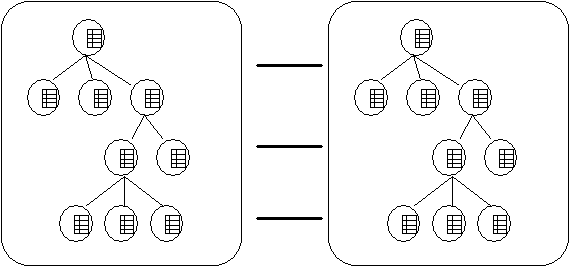
The architecture is shown above. The example shows 2 Java VMs, each has created an instance of TreeCache. These VMs can be located on the same machine, or on 2 different machines. The setup of the underlying group communication subsystem is done using JGroups.
Any modification (see API below) in one cache will be replicated to the other cache[1] and vice versa. Depending on the transactional settings, this replication will occur either after each modification or at the end of a transaction (at commit time). When a new cache is created, it can optionally acquire the contents from one of the existing caches on startup.
Here's some sample code before we dive into the API itself:
TreeCache tree = new TreeCache();
tree.setClusterName("demo-cluster");
tree.setClusterProperties("default.xml"); // uses defaults if not provided
tree.setCacheMode(TreeCache.REPL_SYNC);
tree.createService(); // not necessary, but is same as MBean lifecycle
tree.startService(); // kick start tree cache
tree.put("/a/b/c", "name", "Ben");
tree.put("/a/b/c/d", "uid", new Integer(322649));
Integer tmp = (Integer) tree.get("/a/b/c/d", "uid");
tree.remove("/a/b");
tree.stopService();
tree.destroyService(); // not necessary, but is same as MBean lifecycle
The sample code first creates a TreeCache instance and then configures it. There is another constructor which accepts a number of configuration options. However, the TreeCache can be configured entirely from an XML file (shown later) and we don't recommend manual configuration as shown in the sample.
The cluster name, properties of the underlying JGroups stack, and cache mode (synchronous replication) are configured first (a list of configuration options is shown later). Then we start the TreeCache. If replication is enabled, this will make the TreeCache join the cluster, and acquire initial state from an existing node.
Then we add 2 items into the cache: the first element creates a node "a" with a child node "b" that has a child node "c". (TreeCache by default creates intermediary nodes that don't exist). The key "name" is then inserted into the "/a/b/c" node, with a value of "Ben".
The other element will create just the subnode "d" of "c" because "/a/b/c" already exists. It binds the integer 322649 under key "uid".
The resulting tree looks like this:
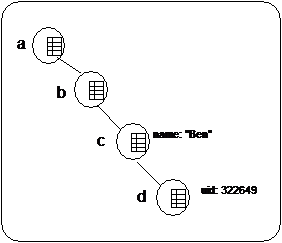
The TreeCache has 4 nodes "a", "b", "c" and "d". Nodes "/a/b/c" has values "name" associated with "Ben" in its map, and node "/a/b/c/d" has values "uid" and 322649.
Each node can be retrieved by its absolute name (e.g. "/a/b/c") or by navigating from parent to children (e.g. navigate from "a" to "b", then from "b" to "c").
The next method in the example gets the value associated with key="uid" in node "/a/b/c/d", which is the integer 322649.
The remove() method then removes node "/a/b" and all subnodes recursively from the cache. In this case, nodes "/a/b/c/d", "/a/b/c" and "/a/b" will be removed, leaving only "/a".
Finally, the TreeCache is stopped. This will cause it to leave the cluster, and every node in the cluster will be notified. Note that TreeCache can be stopped and started again. When it is stopped, all contents will be deleted. And when it is restarted, if it joins a cache group, the state will be replicated initially. So potentially you can recreate the contents.
In the sample, replication was enabled, which caused the 2 put() and the 1 remove() methods to replicated their changes to all nodes in the cluster. The get() method was executed on the local cache only.
Keys into the cache can be either strings separated by slashes ('/'), e.g. "/a/b/c", or they can be fully qualified names Fqns . An Fqn is essentially a list of Objects that need to implement hashCode() and equals(). All strings are actually transformed into Fqns internally. Fqns are more efficient than strings, for example:
String n1 = "/300/322649";
Fqn n2 = new Fqn(new Object{new Integer(300), new Integer(322649)});
In this example, we want to access a node that has information for employee with id=322649 in department with id=300. The string version needs two map lookups on Strings, whereas the Fqn version needs two map lookups on Integers. In a large hashtable, the hashCode() method for String may have collisions, leading to actual string comparisons. Also, clients of the cache may already have identifiers for their objects in Object form, and don't want to transform between Object and Strings, preventing unnecessary copying.
Note that the modification methods are put() and remove(). The only get method is get().
There are 2 put() methods[2] : put(Fqn node, Object key, Object key) and put(Fqn node, Map values). The former takes the node name, creates it if it doesn't yet exist, and put the key and value into the node's map, returning the previous value. The latter takes a map of keys and values and adds them to the node's map, overwriting existing keys and values. Content that is not in the new map remains in the node's map.
There are 3 remove() methods: remove(Fqn node, Object key), remove(Fqn node) and removeData(Fqn node). The first removes the given key from the node. The second removes the entire node and all subnodes, and the third removes all elements from the given node's map.
The get methods are: get(Fqn node) and get(Fqn node, Object key). The former returns a Node[3] object, allowing for direct navigation, the latter returns the value for the given key for a node.
Also, the TreeCache has a number of getters and setters. Since the API may change at any time, we recommend the Javadoc for up-to-date information.
The TreeCache can be configured to be either local (standalone) or clustered. If in a cluster, the cache can be configured to replicate changes, or to invalidate changes. A detailed discussion on this follows.
Local caches don't join a cluster and don't communicate with other nodes in a cluster. Therefore their elements don't need to be serializable - however, we recommend making them serializable, enabling a user to change the cache mode at any time.
Replicated caches replicate all changes to the other TreeCache instances in the cluster. Replication can either happen after each modification (no transactions), or at the end of a transaction (commit time).
Replication can be synchronous or asynchronous . Use of either one of the options is application dependent. Synchronous replication blocks the caller (e.g. on a put()) until the modifications have been replicated successfully to all nodes in a cluster. Asynchronous replication performs replication in the background (the put() returns immediately). TreeCache also offers a replication queue, where modifications are replicated periodically (i.e. interval-based), or when the queue size exceeds a number of elements, or a combination thereof.
Asynchronous replication is faster (no caller blocking), because synchronous replication requires acknowledgments from all nodes in a cluster that they received and applied the modification successfully (round-trip time). However, when a synchronous replication returns successfully, the caller knows for sure that all modifications have been applied at all nodes, whereas this may or may not be the case with asynchronous replication. With asynchronous replication, errors are simply written to a log. Even when using transactions, a transaction may succeed but replication may not succeed on all TreeCache instances.
Buddy Replication allows you to suppress replicating your data to all instances in a cluster. Instead, each instance picks one or more 'buddies' in the cluster, and only replicates to these specific buddies. This greatly helps scalability as there is no longer a memory and network traffic impact every time another instance is added to a cluster.
One of the most common use cases of Buddy Replication is when a replicated cache is used by a servlet container to store HTTP session data. One of the pre-requisites to buddy replication working well and being a real benefit is the use of session affinity, also known as sticky sessions in HTTP session replication speak. What this means is that if certain data is frequently accessed, it is desirable that this is always accessed on one instance rather than in a round-robin fashion as this helps the cache cluster optimise how it chooses buddies, where it stores data, and minimises replication traffic.
If this is not possible, Buddy Replication may prove to be more of an overhead than a benefit.
Buddy Replication uses an instance of a org.jboss.cache.buddyreplication.BuddyLocator which contains the logic used to select buddies in a network. JBoss Cache currently ships with a single implementation, org.jboss.cache.buddyreplication.NextMemberBuddyLocator, which is used as a default if no implementation is provided. The NextMemberBuddyLocator selects the next member in the cluster, as the name suggests, and guarantees an even spread of buddies for each instance.
The NextMemberBuddyLocator takes in 2 parameters, both optional.
- numBuddies - specifies how many buddies each instance should pick to back its data onto. This defaults to 1.
- ignoreColocatedBuddies - means that each instance will try to select a buddy on a different physical host. If not able to do so though, it will fall back to colocated instances. This defaults to true.
Also known as replication groups, a buddy pool is an optional construct where each instance in a cluster may be configured with a buddy pool name. Think of this as an 'exclusive club membership' where when selecting buddies, BuddyLocators would try and select buddies sharing the same buddy pool name. This allows system administrators a degree of flexibility and control over how buddies are selected. For example, a sysadmin may put two instances on two separate physical servers that may be on two separate physical racks in the same buddy pool. So rather than picking an instance on a different host on the same rack, BuddyLocators would rather pick the instance in the same buddy pool, on a separate rack which may add a degree of redundancy.
In the unfortunate event of an instance crashing, it is assumed that the client connecting to the cache (directly or indirectly, via some other service such as HTTP session replication) is able to redirect the request to any other random cache instance in the cluster. This is where a concept of Data Gravitation comes in.
Data Gravitation is a concept where if a request is made on a cache in the cluster and the cache does not contain this information, it then asks other instances in the cluster for the data. If even this fails, it would (optionally) ask other instances to check in the backup data they store for other caches. This means that even if a cache containing your session dies, other instances will still be able to access this data by asking the cluster to search through their backups for this data.
Once located, this data is then transferred to the instance which requested it and is added to this instance's data tree. It is then (optionally) removed from all other instances (and backups) so that if session affinity is used, the affinity should now be to this new cache instance which has just taken ownership of this data.
Data Gravitation is implemented as an interceptor. The following (all optional) configuration properties pertain to data gravitation.
- dataGravitationRemoveOnFind - forces all remote caches that own the data or hold backups for the data to remove that data, thereby making the requesting cache the new data owner. If set to false an evict is broadcast instead of a remove, so any state persisted in cache loaders will remain. This is useful if you have a shared cache loader configured. Defaults to true.
- dataGravitationSearchBackupTrees - Asks remote instances to search through their backups as well as main data trees. Defaults to true. The resulting effect is that if this is true then backup nodes can respond to data gravitation requests in addition to data owners.
- autoDataGravitation - Whether data gravitation occurs for every cache miss. My default this is set to false to prevent unnecessary network calls. Most use cases will know when it may need to gravitate data and will pass in an Option to enable data gravitation on a per-invocation basis. If autoDataGravitation is true this Option is unnecessary.
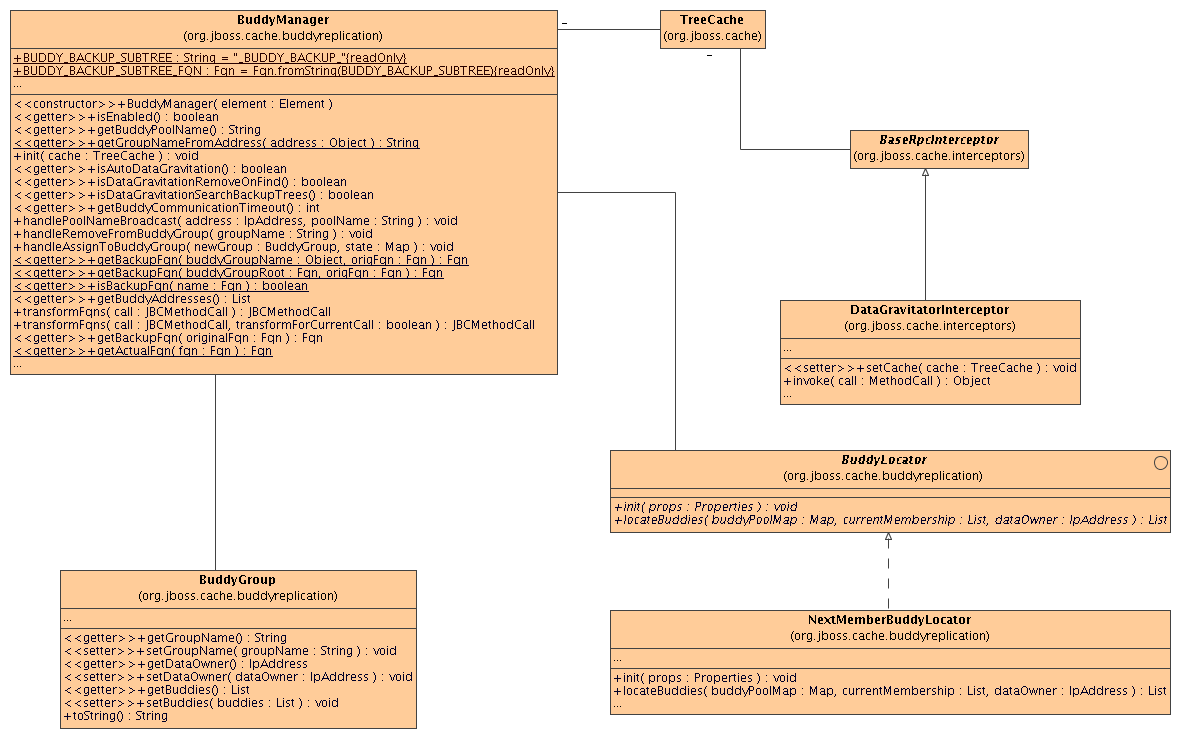
Figure 4.1. Class diagram of the classes involved in buddy replication and how they are related to each other
                    <!-- Buddy Replication config -->
                    <attribute name="BuddyReplicationConfig">
                        <config>

							<!-- Enables buddy replication.  This is the ONLY mandatory configuration element here. -->
                            <buddyReplicationEnabled>true</buddyReplicationEnabled>

							<!-- These are the default values anyway -->
                            <buddyLocatorClass>org.jboss.cache.buddyreplication.NextMemberBuddyLocator</buddyLocatorClass>

							<!-- numBuddies is the number of backup nodes each node maintains.  ignoreColocatedBuddies means that
                                each node will *try* to select a buddy on a different physical host.  If not able to do so though,
                                it will fall back to colocated nodes. -->
                            <buddyLocatorProperties>
                                numBuddies = 1
                                ignoreColocatedBuddies = true
                            </buddyLocatorProperties>

							<!-- A way to specify a preferred replication group.  If specified, we try and pick a buddy why shares
                            the same pool name (falling back to other buddies if not available).  This allows the sysdmin to hint at
                            backup buddies are picked, so for example, nodes may be hinted topick buddies on a different physical rack
                            or power supply for added fault tolerance.  -->
                            <buddyPoolName>myBuddyPoolReplicationGroup</buddyPoolName>

							<!-- Communication timeout for inter-buddy group organisation messages (such as assigning to and removing
                            from groups, defaults to 1000. -->
                            <buddyCommunicationTimeout>2000</buddyCommunicationTimeout>

							<!-- Whether data is removed from old owners when gravitated to a new owner.  Defaults to true.  -->
							<dataGravitationRemoveOnFind>true</dataGravitationRemoveOnFind>

							<!-- Whether backup nodes can respond to data gravitation requests, or only the data owner is supposed to respond.
								defaults to true. -->
							<dataGravitationSearchBackupTrees>true</dataGravitationSearchBackupTrees>

							<!-- Whether all cache misses result in a data gravitation request.  Defaults to false, requiring callers to
								enable data gravitation on a per-invocation basis using the Options API.  -->
						    <autoDataGravitation>false</autoDataGravitation>

                        </config>
                    </attribute>
If a cache is configured for invalidation rather than replication, every time data is changed in a cache other caches in the cluster receive a message informing them that their data is now stale and should be evicted from memory. Invalidation, when used with a shared cache loader (see chapter on Cache Loaders) would cause remote caches to refer to the shared cache loader to retrieve modified data. The benefit of this is twofold: network traffic is minimised as invalidation messages are very small compared to replicating updated data, and also that other caches in the cluster look up modified data in a lazy manner, only when needed.
Invalidation messages are sent after each modification (no transactions), or at the end of a transaction, upon successful commit. This is usually more efficient as invalidation messages can be optimised for the transaction as a whole rather than on a per-modification basis.
Invalidation too can be synchronous or asynchronous, and just as in the case of replication, synchronous invalidation blocks until all caches in the cluster receive invalidation messages and have evicted stale data while asynchronous invalidation works in a 'fire-and-forget' mode, where invalidation messages are broadcast but doesn't block and wait for responses.
JBoss Cache uses a pessimistic locking scheme by default to prevent concurrent access to the same data. Optimistic locking may alternatively be used, and is discussed later.
Locking is done internally, on a node-level. For example when we want to access "/a/b/c", a lock will be acquired for nodes "a", "b" and "c". When the same transaction wants to access "/a/b/c/d", since we already hold locks for "a", "b" and "c", we only need to acquire a lock for "d".
Lock owners are either transactions (call is made within the scope of an existing transaction) or threads (no transaction associated with the call). Regardless, a transaction or a thread is internally transformed into an instance of GlobalTransaction, which is used as a globally unique ID for modifications across a cluster. E.g. when we run a two-phase commit protocol (see below) across the cluster, the GlobalTransaction uniquely identifies the unit of work across a cluster.
Locks can be read or write locks. Write locks serialize read and write access, whereas read-only locks only serialize read access. When a write lock is held, no other write or read locks can be acquired. When a read lock is held, others can acquire read locks. However, to acquire write locks, one has to wait until all read locks have been released. When scheduled concurrently, write locks always have precedence over read locks. Note that (if enabled) read locks can be upgraded to write locks.
Using read-write locks helps in the following scenario: consider a tree with entries "/a/b/n1" and "/a/b/n2". With write-locks, when Tx1 accesses "/a/b/n1", Tx2 cannot access "/a/b/n2" until Tx1 has completed and released its locks. However, with read-write locks this is possible, because Tx1 acquires read-locks for "/a/b" and a read-write lock for "/a/b/n1". Tx2 is then able to acquire read-locks for "/a/b" as well, plus a read-write lock for "/a/b/n2". This allows for more concurrency in accessing the cache.
By default, JBoss Cache uses pessimistic locking. Locking is not exposed directly to user. Instead, a transaction isolation level which provides different locking behaviour is configurable.
JBoss Cache supports the following transaction isolation levels, analogous to database ACID isolation levels. A user can configure an instance-wide isolation level of NONE, READ_UNCOMMITTED, READ_COMMITTED, REPEATABLE_READ, or SERIALIZABLE. REPEATABLE_READ is the default isolation level used.
NONE. No transaction support is needed. There is no locking at this level, e.g., users will have to manage the data integrity. Implementations use no locks.
READ_UNCOMMITTED. Data can be read anytime while write operations are exclusive. Note that this level doesn't prevent the so-called "dirty read" where data modified in Tx1 can be read in Tx2 before Tx1 commits. In other words, if you have the following sequence,
			Tx1   Tx2
		     W
		           R
using this isolation level will not Tx2 read operation. Implementations typically use an exclusive lock for writes while reads don't need to acquire a lock.
READ_COMMITTED. Data can be read any time as long as there is no write. This level prevents the dirty read. But it doesn’t prevent the so-called ‘non-repeatable read’ where one thread reads the data twice can produce different results. For example, if you have the following sequence,
		Tx1   Tx2
		 R
		       W
		 R
where the second read in Tx1 thread will produce different result.
Implementations usually use a read-write lock; reads succeed acquiring the lock when there are only reads, writes have to wait until there are no more readers holding the lock, and readers are blocked acquiring the lock until there are no more writers holding the lock. Reads typically release the read-lock when done, so that a subsequent read to the same data has to re-acquire a read-lock; this leads to nonrepeatable reads, where 2 reads of the same data might return different values. Note that, the write only applies regardless of transaction state (whether it has been committed or not).
REPEATABLE_READ. Data can be read while there is no write and vice versa. This level prevents "non-repeatable read" but it does not prevent the so-called "phantom read" where new data can be inserted into the tree from the other transaction. Implementations typically use a read-write lock. This is the default isolation level used.
SERIALIZABLE. Data access is synchronized with exclusive locks. Only 1 writer or reader can have the lock at any given time. Locks are released at the end of the transaction. Regarded as very poor for performance and thread/transaction concurrency.
The motivation for optimistic locking is to improve concurrency. When a lot of threads have a lot of contention for access to the data tree, it can be inefficient to lock portions of the tree - for reading or writing - for the entire duration of a transaction as we do in pessimistic locking. Optimistic locking allows for greater concurrency of threads and transactions by using a technique called data versioning, explained here. Note that isolation levels (if configured) are ignored if optimistic locking is enabled.
Optimistic locking treats all method calls as transactional[4]. Even if you do not invoke a call within the scope of an ongoing transaction, JBoss Cache creates an implicit transaction and commits this transaction when the invocation completes. Each transaction maintains a transaction workspace, which contains a copy of the data used within the transaction.
For example, if a transaction calls get("/a/b/c"), nodes a, b and c are copied from the main data tree and into the workspace. The data is versioned and all calls in the transaction work on the copy of the data rather than the actual data. When the transaction commits, it's workspace is merged back into the underlying tree by matching versions. If there is a version mismatch - such as when the actual data tree has a higher version than the workspace, perhaps if another transaction were to access the same data, change it and commit before the first transaction can finish - the transaction throws a RollbackException when committing and the commit fails.
Optimistic locking uses the same locks we speak of above, but the locks are only held for a very short duration - at the start of a transaction to build a workspace, and when the transaction commits and has to merge data back into the tree.
So while optimistic locking may occasionally fail if version validations fail or may run slightly slower than pessimistic locking due to the inevitable overhead and extra processing of maintaining workspaces, versioned data and validating on commit, it does buy you a near-SERIALIZABLE degree of data integrity while maintaining a very high level of concurrency.
JBoss Cache can be configured to use transactions to bundle units of work, which can then be replicated as one unit. Alternatively, if transaction support is disabled, it is equivalent to setting AutoCommit to on where modifications are potentially[5] replicated after every change (if replication is enabled).
What JBoss Cache does on every incoming call (e.g. put()) is:
get the transaction associated with the thread
register (if not already done) with the transaction manager to be notified when a transaction commits or is rolled back.
In order to do this, the cache has to be configured with an instance of a TransactionManagerLookup which returns a javax.transaction.TransactionManager.
JBoss Cache ships with JBossTransactionManagerLookup and GenericTransactionManagerLookup. The JBossTransactionManagerLookup is able to bind to a running JBoss Application Server and retrieve a TransactionManager while the GenericTransactionManagerLookup is able to bind to most popular Java EE application servers and provide the same functionality. A dummy implementation - DummyTransactionManagerLookup - is also provided, which may be used for standalone JBoss Cache applications and unit tests running outside a Java EE Application Server. Being a dummy, however, this is just for demo and testing purposes and is not recommended for production use.
The implementation of the JBossTransactionManagerLookup is as follows:
public class JBossTransactionManagerLookup implements TransactionManagerLookup {

    public JBossTransactionManagerLookup() {}

    public TransactionManager getTransactionManager() throws Exception {
       Object tmp=new InitialContext().lookup("java:/TransactionManager");
       return (TransactionManager)tmp;
    }
}
The implementation looks up the JBoss Transaction Manager from JNDI and returns it.
When a call comes in, the TreeCache gets the current transaction and records the modification under the transaction as key. (If there is no transaction, the modification is applied immediately and possibly replicated). So over the lifetime of the transaction all modifications will be recorded and associated with the transaction. Also, the TreeCache registers with the transaction to be notified of transaction committed or aborted when it first encounters the transaction.
When a transaction rolls back, we undo the changes in the cache and release all locks.
When the transaction commits, we initiate a two-phase commit protocol[6] : in the first phase, a PREPARE containing all modifications for the current transaction is sent to all nodes in the cluster. Each node acquires all necessary locks and applies the changes, and then sends back a success message. If a node in a cluster cannot acquire all locks, or fails otherwise, it sends back a failure message.
The coordinator of the two-phase commit protocol waits for all responses (or a timeout, whichever occurs first). If one of the nodes in the cluster responds with FAIL (or we hit the timeout), then a rollback phase is initiated: a ROLLBACK message is sent to all nodes in the cluster. On reception of the ROLLBACK message, every node undoes the changes for the given transaction, and releases all locks held for the transaction.
If all responses are OK, a COMMIT message is sent to all nodes in the cluster. On reception of a COMMIT message, each node applies the changes for the given transaction and releases all locks associated with the transaction.
When we referred to 'transaction', we actually mean a global representation of a local transaction, which uniquely identifies a transaction across a cluster.
Let's look at an example of how to use JBoss Cache in a standalone (i.e. outside an application server) fashion with dummy transactions:
Properties prop = new Properties();
prop.put(Context.INITIAL_CONTEXT_FACTORY, "org.jboss.cache.transaction.DummyContextFactory");
User Transaction tx=(UserTransaction)new InitialContext(prop).lookup("UserTransaction");
TreeCache tree = new TreeCache();
PropertyConfigurator config = new PropertyConfigurator();
config.configure(tree, "META-INF/replSync-service.xml");
tree.createService(); // not necessary
tree.startService(); // kick start tree cache

try {
   tx.begin();
   tree.put("/classes/cs-101", "description", "the basics");
   tree.put("/classes/cs-101", "teacher", "Ben");
   tx.commit();
}
catch(Throwable ex) {
   try { tx.rollback(); } catch(Throwable t) {}
}
The first lines obtain a user transaction using the 'JEE way' via JNDI. Note that we could also say
UserTransaction tx = new DummyUserTransaction(DummyTransactionManager.getInstance());
Then we create a new TreeCache and configure it using a PropertyConfigurator class and a configuration XML file (see below for a list of all configuration options).
Next we start the cache. Then, we start a transaction (and associate it with the current thread internally). Any methods invoked on the cache will now be collected and only applied when the transaction is committed. In the above case, we create a node "/classes/cs-101" and add 2 elements to its map. Assuming that the cache is configured to use synchronous replication, on transaction commit the modifications are replicated. If there is an exception in the methods (e.g. lock acquisition failed), or in the two-phase commit protocol applying the modifications to all nodes in the cluster, the transaction is rolled back.
Eviction policies specify the behavior of a node residing inside the cache, e.g., life time and maximum numbers allowed. Memory constraints on servers mean caches cannot grow indefinitely, so policies need to be in place to restrict the size of the cache in memory.
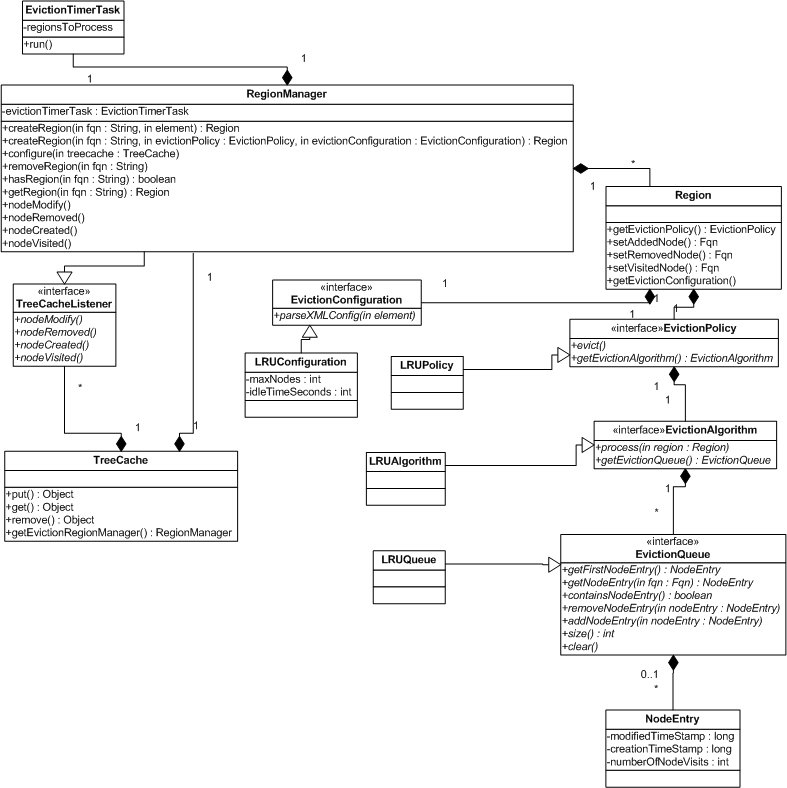
The design of the JBoss Cache eviction policy framework is based on the loosely coupled observable pattern (albeit still synchronous) where the eviction region manager will register a TreeCacheListener to handle cache events and relay them back to the eviction policies. Whenever a cached node is added, removed, evicted, or visited, the eviction registered TreeCacheListener will maintain state statistics and information will be relayed to each individual Eviction Region. Each Region can define a different EvictionPolicy implementation that will know how to correlate cache add, remove, and visit events back to a defined eviction behavior. It's the policy provider's responsibility to decide when to call back the cache "evict" operation.
There is a single eviction thread (timer) that will run at a configured interval. This thread will make calls into each of the policy providers and inform it of any TreeCacheListener aggregated adds, removes and visits (gets) to the cache during the configured interval. The eviction thread is responsible for kicking off the eviction policy processing (a single pass) for each configured eviction cache region.
In order to implement an eviction policy, the following interfaces must be implemented: org.jboss.cache.eviction.EvictionPolicy, org.jboss.cache.eviction.EvictionAlgorithm, org.jboss.cache.eviction.EvictionQueue and org.jboss.cache.eviction.EvictionConfiguration. When compounded together, each of these interface implementations define all the underlying mechanics necessary for a complete eviction policy implementation.
public interface EvictionPolicy
{
   /**
    * Evict a node form the underlying cache.
    *
    * @param fqn DataNode corresponds to this fqn.
    * @throws Exception
    */
   void evict(Fqn fqn) throws Exception;

   /**
    * Return children names as Objects
    *
    * @param fqn
    * @return Child names under given fqn
    */
   Set getChildrenNames(Fqn fqn);

   /**
    * Is this a leaf node?
    *
    * @param fqn
    * @return true/false if leaf node.
    */
   boolean hasChild(Fqn fqn);

   Object getCacheData(Fqn fqn, Object key);

   /**
    * Method called to configure this implementation.
    */
   void configure(TreeCache cache);

   /**
    * Get the associated EvictionAlgorithm used by the EvictionPolicy.
    * <p/>
    * This relationship should be 1-1.
    *
    * @return An EvictionAlgorithm implementation.
    */
   EvictionAlgorithm getEvictionAlgorithm();

   /**
    * The EvictionConfiguration implementation class used by this EvictionPolicy.
    *
    * @return EvictionConfiguration implementation class.
    */
   Class getEvictionConfigurationClass();

}
public interface EvictionAlgorithm
{
/**
* Entry point for evictin algorithm. This is an api called by the EvictionTimerTask
* to process the node events in waiting and actual pruning, if necessary.
*
* @param region Region that this algorithm will operate on.
*/
void process(Region region) throws EvictionException;
/**
* Reset the whole eviction queue. Queue may needs to be reset due to corrupted state, for example.
*
* @param region Region that this algorithm will operate on.
*/
void resetEvictionQueue(Region region);
/**
* Get the EvictionQueue implementation used by this algorithm.
*
* @return the EvictionQueue implementation.
*/
EvictionQueue getEvictionQueue();
}
public interface EvictionQueue
{
   /**
    * Get the first entry in the queue.
    * <p/>
    * If there are no entries in queue, this method will return null.
    * <p/>
    * The first node returned is expected to be the first node to evict.
    *
    * @return first NodeEntry in queue.
    */
   public NodeEntry getFirstNodeEntry();

   /**
    * Retrieve a node entry by Fqn.
    * <p/>
    * This will return null if the entry is not found.
    *
    * @param fqn Fqn of the node entry to retrieve.
    * @return Node Entry object associated with given Fqn param.
    */
   public NodeEntry getNodeEntry(Fqn fqn);

   public NodeEntry getNodeEntry(String fqn);

   /**
    * Check if queue contains the given NodeEntry.
    *
    * @param entry NodeEntry to check for existence in queue.
    * @return true/false if NodeEntry exists in queue.
    */
   public boolean containsNodeEntry(NodeEntry entry);

   /**
    * Remove a NodeEntry from queue.
    * <p/>
    * If the NodeEntry does not exist in the queue, this method will return normally.
    *
    * @param entry The NodeEntry to remove from queue.
    */
   public void removeNodeEntry(NodeEntry entry);

   /**
    * Add a NodeEntry to the queue.
    *
    * @param entry The NodeEntry to add to queue.
    */
   public void addNodeEntry(NodeEntry entry);

   /**
    * Get the size of the queue.
    *
    * @return The number of items in the queue.
    */
   public int size();

   /**
    * Clear the queue.
    */
   public void clear();

}
public interface EvictionConfiguration
{
   public static final int WAKEUP_DEFAULT = 5;

   public static final String ATTR = "attribute";
   public static final String NAME = "name";

   public static final String REGION = "region";
   public static final String WAKEUP_INTERVAL_SECONDS = "wakeUpIntervalSeconds";
   public static final String MAX_NODES = "maxNodes";
   public static final String TIME_TO_IDLE_SECONDS = "timeToIdleSeconds";
   public static final String TIME_TO_LIVE_SECONDS = "timeToLiveSeconds";
   public static final String MAX_AGE_SECONDS = "maxAgeSeconds";
   public static final String MIN_NODES = "minNodes";
   public static final String REGION_POLICY_CLASS = "policyClass";

   /**
    * Parse the XML configuration for the given specific eviction region.
    * <p/>
    * The element parameter should contain the entire region block. An example
    * of an entire Element of the region would be:
    * <p/>
    * <region name="abc">
    * <attribute name="maxNodes">10</attribute>
    * </region>
    *
    * @param element DOM element for the region. <region name="abc"></region>
    * @throws ConfigureException
    */
   public void parseXMLConfig(Element element) throws ConfigureException;
}
Note that:
The EvictionConfiguration class 'parseXMLConfig(Element)' method expects only the DOM element pertaining to the region the policy is being configured for.
The EvictionConfiguration implementation should maintain getter and setter methods for configured properties pertaining to the policy used on a given cache region. (e.g. for LRUConfiguration there is a int getMaxNodes() and a setMaxNodes(int))
Alternatively, the implementation of a new eviction policy provider can be further simplified by extending BaseEvictionPolicy and BaseEvictionAlgorithm. Or for properly sorted EvictionAlgorithms (sorted in eviction order - see LFUAlgorithm) extending BaseSortedEvictionAlgorithm and implementing SortedEvictionQueue takes care of most of the common functionality available in a set of eviction policy provider classes
public abstract class BaseEvictionPolicy implements EvictionPolicy
{
   protected static final Fqn ROOT = new Fqn("/");

   protected TreeCache cache_;

   public BaseEvictionPolicy()
   {
   }

   /** EvictionPolicy interface implementation */

   /**
    * Evict the node under given Fqn from cache.
    *
    * @param fqn The fqn of a node in cache.
    * @throws Exception
    */
   public void evict(Fqn fqn) throws Exception
   {
      cache_.evict(fqn);
   }

   /**
    * Return a set of child names under a given Fqn.
    *
    * @param fqn Get child names for given Fqn in cache.
    * @return Set of children name as Objects
    */
   public Set getChildrenNames(Fqn fqn)
   {
      try
      {
         return cache_.getChildrenNames(fqn);
      }
      catch (CacheException e)
      {
         e.printStackTrace();
      }
      return null;
   }

   public boolean hasChild(Fqn fqn)
   {
      return cache_.hasChild(fqn);
   }

   public Object getCacheData(Fqn fqn, Object key)
   {
      try
      {
         return cache_.get(fqn, key);
      }
      catch (CacheException e)
      {
         e.printStackTrace();
      }
      return null;
   }

   public void configure(TreeCache cache)
   {
      this.cache_ = cache;
   }

}
public abstract class BaseEvictionAlgorithm implements EvictionAlgorithm
{
private static final Log log = LogFactory.getLog(BaseEvictionAlgorithm.class);
protected Region region;
protected BoundedBuffer recycleQueue;
protected EvictionQueue evictionQueue;
/**
* This method will create an EvictionQueue implementation and prepare it for use.
*
* @param region Region to setup an eviction queue for.
* @return The created EvictionQueue to be used as the eviction queue for this algorithm.
* @throws EvictionException
* @see EvictionQueue
*/
protected abstract EvictionQueue setupEvictionQueue(Region region) throws EvictionException;
/**
* This method will check whether the given node should be evicted or not.
*
* @param ne NodeEntry to test eviction for.
* @return True if the given node should be evicted. False if the given node should not be evicted.
*/
protected abstract boolean shouldEvictNode(NodeEntry ne);
protected BaseEvictionAlgorithm()
{
recycleQueue = new BoundedBuffer();
}
protected void initialize(Region region) throws EvictionException
{
this.region = region;
evictionQueue = setupEvictionQueue(region);
}
/**
* Process the given region.
* <p/>
* Eviction Processing encompasses the following:
* <p/>
* - Add/Remove/Visit Nodes
* - Prune according to Eviction Algorithm
* - Empty/Retry the recycle queue of previously evicted but locked (during actual cache eviction) nodes.
*
* @param region Cache region to process for eviction.
* @throws EvictionException
*/
public void process(Region region) throws EvictionException
{
if (this.region == null)
{
this.initialize(region);
}
this.processQueues(region);
this.emptyRecycleQueue();
this.prune();
}
public void resetEvictionQueue(Region region)
{
}
/**
* Get the underlying EvictionQueue implementation.
*
* @return the EvictionQueue used by this algorithm
* @see EvictionQueue
*/
public EvictionQueue getEvictionQueue()
{
return this.evictionQueue;
}
/**
* Event processing for Evict/Add/Visiting of nodes.
* <p/>
* - On AddEvents a new element is added into the eviction queue
* - On RemoveEvents, the removed element is removed from the eviction queue.
* - On VisitEvents, the visited node has its eviction statistics updated (idleTime, numberOfNodeVisists, etc..)
*
* @param region Cache region to process for eviction.
* @throws EvictionException
*/
protected void processQueues(Region region) throws EvictionException
{
EvictedEventNode node;
int count = 0;
while ((node = region.takeLastEventNode()) != null)
{
int eventType = node.getEvent();
Fqn fqn = node.getFqn();
count++;
switch (eventType)
{
case EvictedEventNode.ADD_EVENT:
this.processAddedNodes(fqn);
break;
case EvictedEventNode.REMOVE_EVENT:
this.processRemovedNodes(fqn);
break;
case EvictedEventNode.VISIT_EVENT:
this.processVisitedNodes(fqn);
break;
default:
throw new RuntimeException("Illegal Eviction Event type " + eventType);
}
}
if (log.isTraceEnabled())
{
log.trace("processed " + count + " node events");
}
}
protected void evict(NodeEntry ne)
{
// NodeEntry ne = evictionQueue.getNodeEntry(fqn);
if (ne != null)
{
evictionQueue.removeNodeEntry(ne);
if (!this.evictCacheNode(ne.getFqn()))
{
try
{
recycleQueue.put(ne);
}
catch (InterruptedException e)
{
e.printStackTrace();
}
}
}
}
/**
* Evict a node from cache.
*
* @param fqn node corresponds to this fqn
* @return True if successful
*/
protected boolean evictCacheNode(Fqn fqn)
{
if (log.isTraceEnabled())
{
log.trace("Attempting to evict cache node with fqn of " + fqn);
}
EvictionPolicy policy = region.getEvictionPolicy();
// Do an eviction of this node
try
{
policy.evict(fqn);
}
catch (Exception e)
{
if (e instanceof TimeoutException)
{
log.warn("eviction of " + fqn + " timed out. Will retry later.");
return false;
}
e.printStackTrace();
return false;
}
if (log.isTraceEnabled())
{
log.trace("Eviction of cache node with fqn of " + fqn + " successful");
}
return true;
}
/**
* Process an Added cache node.
*
* @param fqn FQN of the added node.
* @throws EvictionException
*/
protected void processAddedNodes(Fqn fqn) throws EvictionException
{
if (log.isTraceEnabled())
{
log.trace("Adding node " + fqn + " to eviction queue");
}
long stamp = System.currentTimeMillis();
NodeEntry ne = new NodeEntry(fqn);
ne.setModifiedTimeStamp(stamp);
ne.setNumberOfNodeVisits(1);
// add it to the node map and eviction queue
if (evictionQueue.containsNodeEntry(ne))
{
if (log.isTraceEnabled())
{
log.trace("Queue already contains " + ne.getFqn() + " processing it as visited");
}
this.processVisitedNodes(ne.getFqn());
return;
}
evictionQueue.addNodeEntry(ne);
if (log.isTraceEnabled())
{
log.trace(ne.getFqn() + " added successfully to eviction queue");
}
}
/**
* Remove a node from cache.
* <p/>
* This method will remove the node from the eviction queue as well as
* evict the node from cache.
* <p/>
* If a node cannot be removed from cache, this method will remove it from the eviction queue
* and place the element into the recycleQueue. Each node in the recycle queue will get retried until
* proper cache eviction has taken place.
* <p/>
* Because EvictionQueues are collections, when iterating them from an iterator, use iterator.remove()
* to avoid ConcurrentModificationExceptions. Use the boolean parameter to indicate the calling context.
*
* @param fqn FQN of the removed node
* @throws EvictionException
*/
protected void processRemovedNodes(Fqn fqn) throws EvictionException
{
if (log.isTraceEnabled())
{
log.trace("Removing node " + fqn + " from eviction queue and attempting eviction");
}
NodeEntry ne = evictionQueue.getNodeEntry(fqn);
if (ne != null)
{
evictionQueue.removeNodeEntry(ne);
}
if (log.isTraceEnabled())
{
log.trace(fqn + " removed from eviction queue");
}
}
/**
* Visit a node in cache.
* <p/>
* This method will update the numVisits and modifiedTimestamp properties of the Node.
* These properties are used as statistics to determine eviction (LRU, LFU, MRU, etc..)
* <p/>
* *Note* that this method updates Node Entries by reference and does not put them back
* into the queue. For some sorted collections, a remove, and a re-add is required to
* maintain the sorted order of the elements.
*
* @param fqn FQN of the visited node.
* @throws EvictionException
*/
protected void processVisitedNodes(Fqn fqn) throws EvictionException
{
NodeEntry ne = evictionQueue.getNodeEntry(fqn);
if (ne == null)
{
this.processAddedNodes(fqn);
return;
}
// note this method will visit and modify the node statistics by reference!
// if a collection is only guaranteed sort order by adding to the collection,
// this implementation will not guarantee sort order.
ne.setNumberOfNodeVisits(ne.getNumberOfNodeVisits() + 1);
ne.setModifiedTimeStamp(System.currentTimeMillis());
}
/**
* Empty the Recycle Queue.
* <p/>
* This method will go through the recycle queue and retry to evict the nodes from cache.
*
* @throws EvictionException
*/
protected void emptyRecycleQueue() throws EvictionException
{
while (true)
{
Fqn fqn;
try
{
fqn = (Fqn) recycleQueue.poll(0);
}
catch (InterruptedException e)
{
e.printStackTrace();
break;
}
if (fqn == null)
{
if (log.isTraceEnabled())
{
log.trace("Recycle queue is empty");
}
break;
}
if (log.isTraceEnabled())
{
log.trace("emptying recycle bin. Evict node " + fqn);
}
// Still doesn't work
if (!evictCacheNode(fqn))
{
try
{
recycleQueue.put(fqn);
}
catch (InterruptedException e)
{
e.printStackTrace();
}
break;
}
}
}
protected void prune() throws EvictionException
{
NodeEntry entry;
while ((entry = evictionQueue.getFirstNodeEntry()) != null)
{
if (this.shouldEvictNode(entry))
{
this.evict(entry);
}
else
{
break;
}
}
}
}Note that:
The BaseEvictionAlgorithm class maintains a processing structure. It will process the ADD, REMOVE, and VISIT events queued by the Region (events are originated from the EvictionTreeCacheListener) first. It also maintains an collection of items that were not properly evicted during the last go around because of held locks. That list is pruned. Finally, the EvictionQueue itself is pruned for entries that should be evicted based upon the configured eviction rules for the region.
   public abstract class BaseSortedEvictionAlgorithm extends BaseEvictionAlgorithm implements EvictionAlgorithm
   {
      private static final Log log = LogFactory.getLog(BaseSortedEvictionAlgorithm.class);

      public void process(Region region) throws EvictionException
      {
         super.process(region);
      }

      protected void processQueues(Region region) throws EvictionException
      {
         boolean evictionNodesModified = false;

         EvictedEventNode node;
         int count = 0;
         while ((node = region.takeLastEventNode()) != null)
         {
            int eventType = node.getEvent();
            Fqn fqn = node.getFqn();

            count++;
            switch (eventType)
            {
               case EvictedEventNode.ADD_EVENT:
                  this.processAddedNodes(fqn);
                  evictionNodesModified = true;
                  break;
               case EvictedEventNode.REMOVE_EVENT:
                  this.processRemovedNodes(fqn);
                  break;
               case EvictedEventNode.VISIT_EVENT:
                  this.processVisitedNodes(fqn);
                  evictionNodesModified = true;
                  break;
               default:
                  throw new RuntimeException("Illegal Eviction Event type " + eventType);
            }
         }

         if (log.isTraceEnabled())
         {
            log.trace("Eviction nodes visited or added requires resort of queue " + evictionNodesModified);
         }

         this.resortEvictionQueue(evictionNodesModified);


         if (log.isTraceEnabled())
         {
            log.trace("processed " + count + " node events");
         }

      }

      /**
       * This method is called to resort the queue after add or visit events have occurred.
       * <p/>
       * If the parameter is true, the queue needs to be resorted. If it is false, the queue does not
       * need resorting.
       *
       * @param evictionQueueModified True if the queue was added to or visisted during event processing.
       */
      protected void resortEvictionQueue(boolean evictionQueueModified)
      {
         long begin = System.currentTimeMillis();
         ((SortedEvictionQueue) evictionQueue).resortEvictionQueue();
         long end = System.currentTimeMillis();

         if (log.isTraceEnabled())
         {
            long diff = end - begin;
            log.trace("Took " + diff + "ms to sort queue with " + getEvictionQueue().size() + " elements");
         }
      }

   }
Note that:
The BaseSortedEvictionAlgorithm class will maintain a boolean through the algorithm processing that will determine if any new nodes were added or visited. This allows the Algorithm to determine whether to resort the eviction queue items (in first to evict order) or to skip the potentially expensive sorting if there have been no changes to the cache in this region.
public interface SortedEvictionQueue extends EvictionQueue
{
   /**
    * Provide contract to resort a sorted queue.
    */
   public void resortEvictionQueue();
}
Note that:
The SortedEvictionQueue interface defines the contract used by the BaseSortedEvictionAlgorithm abstract class that is used to resort the underlying queue. Again, the queue sorting should be sorted in first to evict order. The first entry in the list should evict before the last entry in the queue. The last entry in the queue should be the last entry that will require eviction.
TreeCache 1.2.X allows a single eviction policy provider class to be configured for use by all regions. As of TreeCache 1.3.x each cache region can define its own eviction policy provider or it can use the eviction policy provider class defined at the cache level (1.2.x backwards compatibility)
Here is an example of a legacy 1.2.x EvictionPolicyConfig element to configure TreeCache for use with a single eviction policy provider
          <attribute name="EvictionPolicyClass">org.jboss.cache.eviction.LRUPolicy</attribute>
          <!-- Specific eviction policy configurations. This is LRU -->
          <attribute name="EvictionPolicyConfig">
             <config>
                <attribute name="wakeUpIntervalSeconds">5</attribute>
                <!-- Cache wide default -->
                <region name="/_default_">
                    <attribute name="maxNodes">5000</attribute>
                    <attribute name="timeToLiveSeconds">1000</attribute>
                </region>
                <region name="/org/jboss/data">
                    <attribute name="maxNodes">5000</attribute>
                    <attribute name="timeToLiveSeconds">1000</attribute>
                </region>
                <region name="/org/jboss/test/data">
                    <attribute name="maxNodes">5</attribute>
                    <attribute name="timeToLiveSeconds">4</attribute>
                </region>
                <region name="/test/">
                    <attribute name="maxNodes">10000</attribute>
                    <attribute name="timeToLiveSeconds">5</attribute>
                </region>
                <region name="/maxAgeTest/">
                   <attribute name="maxNodes">10000</attribute>
                   <attribute name="timeToLiveSeconds">8</attribute>
                   <attribute name="maxAgeSeconds">10</attribute>
                </region>
             </config>
          </attribute>
Here is an example of configuring a different eviction provider per region
      <attribute name="EvictionPolicyConfig">
         <config>
            <attribute name="wakeUpIntervalSeconds">5</attribute>
            <!-- Cache wide default -->
            <region name="/_default_" policyClass="org.jboss.cache.eviction.LRUPolicy">
               <attribute name="maxNodes">5000</attribute>
               <attribute name="timeToLiveSeconds">1000</attribute>
            </region>
            <region name="/org/jboss/data" policyClass="org.jboss.cache.eviction.LFUPolicy">
               <attribute name="maxNodes">5000</attribute>
               <attribute name="minNodes">1000</attribute>
            </region>
            <region name="/org/jboss/test/data" policyClass="org.jboss.cache.eviction.FIFOPolicy">
               <attribute name="maxNodes">5</attribute>
            </region>
            <region name="/test/" policyClass="org.jboss.cache.eviction.MRUPolicy">
               <attribute name="maxNodes">10000</attribute>
            </region>
            <region name="/maxAgeTest/" policyClass="org.jboss.cache.eviction.LRUPolicy">
               <attribute name="maxNodes">10000</attribute>
               <attribute name="timeToLiveSeconds">8</attribute>
               <attribute name="maxAgeSeconds">10</attribute>
            </region>
         </config>
      </attribute>
Lastly, an example of mixed mode. In this scenario the regions that have a specific policy defined will use that policy. Those that do not will default to the policy defined on the entire cache instance.
      <attribute name="EvictionPolicyClass">org.jboss.cache.eviction.LRUPolicy</attribute>
      <!-- Specific eviction policy configurations. This is LRU -->
      <attribute name="EvictionPolicyConfig">
         <config>
            <attribute name="wakeUpIntervalSeconds">5</attribute>
            <!-- Cache wide default -->
            <region name="/_default_">
               <attribute name="maxNodes">5000</attribute>
               <attribute name="timeToLiveSeconds">1000</attribute>
            </region>
            <region name="/org/jboss/data" policyClass="org.jboss.cache.eviction.FIFOPolicy">
               <attribute name="maxNodes">5000</attribute>
            </region>
            <region name="/test/" policyClass="org.jboss.cache.eviction.MRUPolicy">
               <attribute name="maxNodes">10000</attribute>
            </region>
            <region name="/maxAgeTest/">
               <attribute name="maxNodes">10000</attribute>
               <attribute name="timeToLiveSeconds">8</attribute>
               <attribute name="maxAgeSeconds">10</attribute>
            </region>
         </config>
      </attribute>
TreeCache now allows reconfiguration of eviction policy providers programatically at runtime. An example of how to reconfigure at runtime and how to set an LRU region to have maxNodes to 12345 timeToLiveSeconds to 500 and maxAgeSeconds to 1000 programatically.
         // note this is just to show that a running TreeCache instance must be
         // retrieved somehow. How it is implemented is up to the implementor.
         TreeCache cache = getRunningTreeCacheInstance();

         org.jboss.cache.eviction.RegionManager regionManager = cache.getEvictionRegionManager();
         org.jboss.cache.eviction.Region region = regionManager.getRegion("/myRegionName");
         EvictionConfiguation config = region.getEvictionConfiguration();
         ((LRUConfiguration)config).setMaxNodes(12345);
         ((LRUConfiguration)config).setTimeToLiveSeconds(500);
         ((LRUConfiguration)config).setMaxAgeSeconds(1000);
TreeCache has implemented a LRU eviction policy, org.jboss.cache.eviction.LRUPolicy, that controls both the node lifetime and age. This policy guarantees O(n) = 1 for adds, removals and lookups (visits). It has the following configuration parameters:
wakeUpIntervalSeconds. This is the interval (in seconds) to process the node events and also to perform sweeping for the size limit and age-out nodes.
Region. Region is a group of nodes that possess the same eviction policy, e.g., same expired time. In TreeCache, region is denoted by a fqn, e.g., /company/personnel, and it is recursive. In specifying the region, the order is important. For example, if /org/jboss/test is specified before /org/jboss/test/data, then any node under /org/jboss/test/data belongs to the first region rather than the second. Note also that whenever eviction policy is activated, there should always be a /_default_ region which covers all the eviction policies not specified by the user. In addition, the region configuration is not programmable, i.e., all the policies have to be specified via XML configuration.
maxNodes. This is the maximum number of nodes allowed in this region. 0 denotes no limit.
timeToLiveSeconds. Time to idle (in seconds) before the node is swept away. 0 denotes no limit.
maxAgeSeconds. Time an object should exist in TreeCache (in seconds) regardless of idle time before the node is swept away. 0 denotes no limit.
Please see the above section for an example.
TreeCache has implemented a FIFO eviction policy, org.jboss.cache.eviction.FIFOPolicy, that will control the eviction in a proper first in first out order. This policy guarantees O(n) = 1 for adds, removals and lookups (visits). It has the following configuration parameters:
wakeUpIntervalSeconds. This is the interval (in seconds) to process the node events and also to perform sweeping for the size limit and age-out nodes.
Region. Region is a group of nodes that possess the same eviction policy, e.g., same expired time. In TreeCache, region is denoted by a fqn, e.g., /company/personnel, and it is recursive. In specifying the region, the order is important. For example, if /org/jboss/test is specified before /org/jboss/test/data, then any node under /org/jboss/test/data belongs to the first region rather than the second. Note also that whenever eviction policy is activated, there should always be a /_default_ region which covers all the eviction policies not specified by the user. In addition, the region configuration is not programmable, i.e., all the policies have to be specified via XML configuration.
maxNodes. This is the maximum number of nodes allowed in this region. Any integer less than or equal to 0 will throw an exception when the policy provider is being configured for use.
Please read the above section for an example.
TreeCache has implemented a MRU eviction policy, org.jboss.cache.eviction.MRUPolicy, that will control the eviction in based on most recently used algorithm. The most recently used nodes will be the first to evict with this policy. This policy guarantees O(n) = 1 for adds, removals and lookups (visits). It has the following configuration parameters:
wakeUpIntervalSeconds. This is the interval (in seconds) to process the node events and also to perform sweeping for the size limit and age-out nodes.
Region. Region is a group of nodes that possess the same eviction policy, e.g., same expired time. In TreeCache, region is denoted by a fqn, e.g., /company/personnel, and it is recursive. In specifying the region, the order is important. For example, if /org/jboss/test is specified before /org/jboss/test/data, then any node under /org/jboss/test/data belongs to the first region rather than the second. Note also that whenever eviction policy is activated, there should always be a /_default_ region which covers all the eviction policies not specified by the user. In addition, the region configuration is not programmable, i.e., all the policies have to be specified via XML configuration.
maxNodes. This is the maximum number of nodes allowed in this region. Any integer less than or equal to 0 will throw an exception when the policy provider is being configured for use.
Please read the above section for an example.
TreeCache has implemented a LFU eviction policy, org.jboss.cache.eviction.LFUPolicy, that will control the eviction in based on least frequently used algorithm. The least frequently used nodes will be the first to evict with this policy. Node usage starts at 1 when a node is first added. Each time it is visted, the node usage counter increments by 1. This number is used to determine which nodes are least frequently used. LFU is also a sorted eviction algorithm. The underlying EvictionQueue implementation and algorithm is sorted in ascending order of the node visits counter. This class guarantees O(n) = 1 for adds, removal and searches. However, when any number of nodes are added/visited to the queue for a given processing pass, a single O(n) = n*log(n) operation is used to resort the queue in proper LFU order. Similarly if any nodes are removed or evicted, a single O(n) = n pruning operation is necessary to clean up the EvictionQueue. LFU has the following configuration parameters:
wakeUpIntervalSeconds. This is the interval (in seconds) to process the node events and also to perform sweeping for the size limit and age-out nodes.
Region. Region is a group of nodes that possess the same eviction policy, e.g., same expired time. In TreeCache, region is denoted by a fqn, e.g., /company/personnel, and it is recursive. In specifying the region, the order is important. For example, if /org/jboss/test is specified before /org/jboss/test/data, then any node under /org/jboss/test/data belongs to the first region rather than the second. Note also that whenever eviction policy is activated, there should always be a /_default_ region which covers all the eviction policies not specified by the user. In addition, the region configuration is not programmable, i.e., all the policies have to be specified via XML configuration.
maxNodes. This is the maximum number of nodes allowed in this region. A value of 0 for maxNodes means that there is no upper bound for the configured cache region.
minNodes. This is the minimum number of nodes allowed in this region. This value determines what the eviction queue should prune down to per pass. e.g. If minNodes is 10 and the cache grows to 100 nodes, the cache is pruned down to the 10 most frequently used nodes when the eviction timer makes a pass through the eviction algorithm.
Please read the above section for an example.
JBoss Cache can use a cache loader to back up the in-memory cache to a backend datastore. If JBoss Cache is configured with a cache loader, then the following features are provided:
- Whenever a cache element is accessed, and that element is not in the cache (e.g. due to eviction or due to server restart), then the cache loader transparently loads the element into the cache if found in the backend store.
- Whenever an element is modified, added or removed, then that modification is persisted in the backend store via the cache loader. If transactions are used, all modifications created within a transaction are persisted. To this end, the cache loader takes part in the two phase commit protocol run by the transaction manager.
Currently, the cache loader API looks similar to the TreeCache API. In the future, they will both implement the same interface. The goal is to be able to form hierarchical cache topologies, where one cache can delegate to another, which in turn may delegate to yet another cache.
As of JBossCache 1.3.0, you can now define several cache loaders, in a chain. The impact is that the cache will look at all of the cache loaders in the order they've been configured, until it finds a valid, non-null element of data. When performing writes, all cache loaders are written to (except if the ignoreModifications element has been set to true for a specific cache loader. See the configuration section below for details.
The cache loader interface is defined in org.jboss.cache.loader.CacheLoader as follows (edited for brevity):
public interface CacheLoader extends Service {

   /**
    * Sets the configuration. Will be called before {@link #create()} and {@link #start()}
    * @param props A set of properties specific to a given CacheLoader
    */
   void setConfig(Properties props);

   void setCache(TreeCache c);


   /**
    * Returns a list of children names, all names are <em>relative</em>. Returns null if the parent node is not found.
    * The returned set must not be modified, e.g. use Collections.unmodifiableSet(s) to return the result
    * @param fqn The FQN of the parent
    * @return Set<String>. A list of children. Returns null if no children nodes are present, or the parent is
    * not present
    */
   Set getChildrenNames(Fqn fqn) throws Exception;


   /**
    * Returns the value for a given key. Returns null if the node doesn't exist, or the value is not bound
    */
   Object get(Fqn name, Object key) throws Exception;


   /**
    * Returns all keys and values from the persistent store, given a fully qualified name.
    *
    * NOTE that the expected return value of this method has changed from JBossCache 1.2.x
    * and before!  This will affect cache loaders written prior to JBossCache 1.3.0 and such
    * implementations should be checked for compliance with the behaviour expected.
    *
    * @param name
    * @return Map<Object,Object> of keys and values for the given node. Returns null if the node is not
    * found.  If the node is found but has no attributes, this method returns an empty Map.
    * @throws Exception
    */
   Map get(Fqn name) throws Exception;


   /**
    * Checks whether the CacheLoader has a node with Fqn
    * @return True if node exists, false otherwise
    */
   boolean exists(Fqn name) throws Exception;


   /**
    * Inserts key and value into the attributes hashmap of the given node. If the node does not exist, all
    * parent nodes from the root down are created automatically
    */
   void put(Fqn name, Object key, Object value) throws Exception;

   /**
    * Inserts all elements of attributes into the attributes hashmap of the given node, overwriting existing
    * attributes, but not clearing the existing hashmap before insertion (making it a union of existing and
    * new attributes)
    * If the node does not exist, all parent nodes from the root down are created automatically
    * @param name The fully qualified name of the node
    * @param attributes A Map of attributes. Can be null
    */
   void put(Fqn name, Map attributes) throws Exception;

   /**
    * Inserts all modifications to the backend store. Overwrite whatever is already in
    * the datastore.
    * @param modifications A List<Modification> of modifications
    * @throws Exception
    */
   void put(List modifications) throws Exception;

   /** Removes the given key and value from the attributes of the given node. No-op if node doesn't exist */
   void remove(Fqn name, Object key) throws Exception;

   /**
    * Removes the given node. If the node is the root of a subtree, this will recursively remove all subnodes,
    * depth-first
    */
   void remove(Fqn name) throws Exception;

   /** Removes all attributes from a given node, but doesn't delete the node itself */
   void removeData(Fqn name) throws Exception;


   /**
    * Prepare the modifications. For example, for a DB-based CacheLoader:
    * <ol>
    * <li>Create a local (JDBC) transaction
    * <li>Associate the local transaction with <code>tx</code> (tx is the key)
    * <li>Execute the coresponding SQL statements against the DB (statements derived from modifications)
    * </ol>
    * For non-transactional CacheLoader (e.g. file-based), this could be a null operation
    * @param tx            The transaction, just used as a hashmap key
    * @param modifications List<Modification>, a list of all modifications within the given transaction
    * @param one_phase     Persist immediately and (for example) commit the local JDBC transaction as well. When true,
    *                      we won't get a {@link #commit(Object)} or {@link #rollback(Object)} method call later
    */
   void prepare(Object tx, List modifications, boolean one_phase) throws Exception;

   /**
    * Commit the transaction. A DB-based CacheLoader would look up the local JDBC transaction asociated
    * with <code>tx</code> and commit that transaction<br/>
    * Non-transactional CacheLoaders could simply write the data that was previously saved transiently under the
    * given <code>tx</code> key, to (for example) a file system (note this only holds if the previous prepare() did
    * not define one_phase=true
    */
   void commit(Object tx) throws Exception;

   /**
    * Roll the transaction back. A DB-based CacheLoader would look up the local JDBC transaction asociated
    * with <code>tx</code> and roll back that transaction
    */
   void rollback(Object tx);

   /**
    * Fetch the entire state for this cache from secondary storage (disk, DB) and return it as a byte buffer.
    * This is for initialization of a new cache from a remote cache. The new cache would then call
    * storeEntireState()
    * todo: define binary format for exchanging state
    */
   byte[] loadEntireState() throws Exception;

   /** Store the given state in secondary storage. Overwrite whatever is currently in storage */
   void storeEntireState(byte[] state) throws Exception;
}
NOTE: the contract defined by the CacheLoader interface has changed from JBoss Cache 1.3.0 onwards, specifically with the get(Fqn fqn) method. Special care must be taken with custom CacheLoader implementations to ensure this new contract is still adhered to. See the javadoc above on this method for details, or visit this wiki page for more discussion on this.
CacheLoader implementations that need to support partial state transfer should also implement the subinterface org.jboss.cache.loader.ExtendedCacheLoader:
public interface ExtendedCacheLoader extends CacheLoader
{
   /**
    * Fetch a portion of the state for this cache from secondary storage
    * (disk, DB) and return it as a byte buffer.
    * This is for activation of a portion of new cache from a remote cache.
    * The new cache would then call {@link #storeState(byte[], Fqn)}.
    *
    * @param subtree Fqn naming the root (i.e. highest level parent) node of
    *                the subtree for which state is requested.
    *
    * @see org.jboss.cache.TreeCache#activateRegion(String)
    */
   byte[] loadState(Fqn subtree) throws Exception;

   /**
    * Store the given portion of the cache tree's state in secondary storage.
    * Overwrite whatever is currently in secondary storage.  If the transferred
    * state has Fqns equal to or children of parameter subtree,
    * then no special behavior is required.  Otherwise, ensure that
    * the state is integrated under the given 'subtree'. Typically
    * in the latter case 'subtree' would be the Fqn of the buddy
    * backup region for a buddy group; e.g.
    *
    * If the the transferred state had Fqns starting with "/a" and
    * 'subtree' was "/_BUDDY_BACKUP_/192.168.1.2:5555" then the
    * state should be stored in the local persistent store under
    * "/_BUDDY_BACKUP_/192.168.1.2:5555/a"
    *
    * @param state   the state to store
    * @param subtree Fqn naming the root (i.e. highest level parent) node of
    *                the subtree included in 'state'.  If the Fqns
    *                of the data included in 'state' are not
    *                already children of 'subtree', then their
    *                Fqns should be altered to make them children of
    *                'subtree' before they are persisted.
    */
   void storeState(byte[] state, Fqn subtree) throws Exception;

   /**
    * Sets the {@link RegionManager} this object should use to manage
    * marshalling/unmarshalling of different regions using different
    * classloaders.
    *
    * NOTE: This method is only intended to be used by the TreeCache instance
    * this cache loader is associated with.
    *
    * @param manager    the region manager to use, or null.
    */
   void setRegionManager(RegionManager manager);

}
NOTE: If a cache loader is used along with buddy replication, the cache loader must implement ExtendedCacheLoader unless its FetchPersistentState property is set to false.
NOTE: the contract defined by the ExtendedCacheLoader interface has changed from JBoss Cache 1.4.0 onwards, specifically with the requirement that data passed to storeState method be integrated under the given subtree, even if that data didn't originate in that subtree. This behavior is necessary to properly support buddy replication. Special care must be taken with custom ExtendedCacheLoader implementations to ensure this new contract is still adhered to.
The interaction between JBoss Cache and a CacheLoader implementation is as follows. When CacheLoaderConfiguration (see below) is non-null, an instance of each configured cacheloader is created when the cache is created. Since CacheLoader extends Service,
public interface Service {
   void create() throws Exception;

   void start() throws Exception;

   void stop();

   void destroy();
}
CacheLoader.create() and CacheLoader.start() are called when the cache is started. Correspondingly, stop() and destroy() are called when the cache is stopped.
Next, setConfig() and setCache() are called. The latter can be used to store a reference to the cache, the former is used to configure this instance of the CacheLoader. For example, here a database CacheLoader could establish a connection to the database.
The CacheLoader interface has a set of methods that are called when no transactions are used: get(), put(), remove() and removeData(): they get/set/remove the value immediately. These methods are described as javadoc comments in the above interface.
Then there are three methods that are used with transactions: prepare(), commit() and rollback(). The prepare() method is called when a transaction is to be committed. It has a transaction object and a list of modfications as argument. The transaction object can be used as a key into a hashmap of transactions, where the values are the lists of modifications. Each modification list has a number of Modification elements, which represent the changes made to a cache for a given transaction. When prepare() returns successfully, then the CacheLoader must be able to commit (or rollback) the transaction successfully.
Currently, the TreeCache takes care of calling prepare(), commit() and rollback() on the CacheLoaders at the right time. We intend to make both the TreeCache and the CacheLoaders XA resources, so that instead of calling those methods on a loader, the cache will only enlist the loader with the TransactionManager on the same transaction.
The commit() method tells the CacheLoader to commit the transaction, and the rollback() method tells the CacheLoader to discard the changes associated with that transaction.
The last two methods are loadEntireState() and storeEntireState(). The first method asks the CacheLoader to get the entire state the backend store manages and return it as a byte buffer, and the second tells a CacheLoader to replace its entire state with the byte buffer argument. These methods are used for scenarios where each JBossCache node in a cluster has its own local data store, e.g. a local DB, and - when a new node starts - we have to initialize its backend store with the contents of the backend store of an existing member. See below for deails.
The ExtendedCacheLoader methods are also related to state transfer. The loadState(Fqn) method is called when the cache is preparing a partial state transfer -- that is, the transfer of just the portion of the cache loader's state that is rooted in the given Fqn. The storeState(byte[], Fqn) method is then invoked on the cache loader of the node that is receiving the state transfer. Partial state transfers occur when the cache's activateRegion() API is used and during the formation of buddy groups if buddy replication is used.
The CacheLoader is configured as follows in the JBossCache XML file:
    <!-- ==================================================================== -->
    <!-- Defines TreeCache configuration                                      -->
    <!-- ==================================================================== -->

    <mbean code="org.jboss.cache.TreeCache" name="jboss.cache:service=TreeCache">

        <!-- New 1.3.x cache loader config block -->
        <attribute name="CacheLoaderConfiguration">
            <config>
                <!-- if passivation is true, only the first cache loader is used; the rest are ignored -->
                <passivation>false</passivation>
                <!-- comma delimited FQNs to preload -->
                <preload>/</preload>
                <!-- are the cache loaders shared in a cluster? -->
                <shared>false</shared>

                <!-- we can now have multiple cache loaders, which get chained -->
                <!-- the 'cacheloader' element may be repeated -->
                <cacheloader>
                    <class>org.jboss.cache.loader.JDBCCacheLoader</class>
                    <!-- same as the old CacheLoaderConfig attribute -->
                    <properties>
                        cache.jdbc.driver=com.mysql.jdbc.Driver
                        cache.jdbc.url=jdbc:mysql://localhost:3306/jbossdb
                        cache.jdbc.user=root
                        cache.jdbc.password=
                    </properties>
                    <!-- whether the cache loader writes are asynchronous -->
                    <async>false</async>
                    <!-- only one cache loader in the chain may set fetchPersistentState to true.
                        An exception is thrown if more than one cache loader sets this to true. -->
                    <fetchPersistentState>true</fetchPersistentState>
                    <!-- determines whether this cache loader ignores writes - defaults to false. -->
                    <ignoreModifications>false</ignoreModifications>
                    <!-- if set to true, purges the contents of this cache loader when the cache starts up.
                    Defaults to false.  -->
                    <purgeOnStartup>false</purgeOnStartup>
                </cacheloader>

            </config>
        </attribute>

    </mbean>
Note: In JBossCache releases prior to 1.3.0, the cache loader configuration block used to look like this. Note that this form is DEPRECATED and you will have to replace your cache loader configuration with a block similar to the one above.
    <!-- ==================================================================== -->
    <!-- Defines TreeCache configuration                                      -->
    <!-- ==================================================================== -->

    <mbean code="org.jboss.cache.TreeCache" name="jboss.cache:service=TreeCache">
       <attribute name="CacheLoaderClass">org.jboss.cache.loader.bdbje.BdbjeCacheLoader</attribute>
       <!-- attribute name="CacheLoaderClass">org.jboss.cache.loader.FileCacheLoader</attribute -->
       <attribute name="CacheLoaderConfig" replace="false">
         location=c:\\tmp\\bdbje
       </attribute>
       <attribute name="CacheLoaderShared">true</attribute>
       <attribute name="CacheLoaderPreload">/</attribute>
       <attribute name="CacheLoaderFetchTransientState">false</attribute>
       <attribute name="CacheLoaderFetchPersistentState">true</attribute>
       <attribute name="CacheLoaderAsynchronous">true</attribute>
    </mbean>
The CacheLoaderClass attribute defines the class of the CacheLoader implementation. (Note that, because of a bug in the properties editor in JBoss, backslashes in variables for Windows filenames might not get expanded correctly, so replace="false" may be necessary).
The currently available implementations shipped with JBossCache are:
FileCacheLoader, which is a simple filesystem-based implementation. The <cacheloader><properties> element needs to contain a "location" property, which maps to a directory where the file is located (e.g., "location=c:\\tmp").
BdbjeCacheLoader, which is a CacheLoader implementation based on the Sleepycat DB Java Edition. The <cacheloader><properties> element needs to contain a "location" property, which maps to a directory,where the database file for Sleepycat resides (e.g., "location=c:\\tmp").
JDBCCacheLoader, which is a CacheLoader implementation using JDBC to access any relational database. The <cacheloader><properties> element contains a number of properties needed to connect to the database such as username, password, and connection URL. See the section on JDBCCacheLoader for more details.
LocalDelegatingCacheLoader, which enables loading from and storing to another local (same VM) TreeCache.
TcpDelegatingCacheLoader, which enables loading from and storing to a remote (different VM) TreeCache using TCP as the transport mechanism. This CacheLoader is available in JBossCache version 1.3.0 and above.
ClusteredCacheLoader, which allows querying of other caches in the same cluster for in-memory data via the same clustering protocols used to replicate data. Writes are not 'stored' though, as replication would take care of any updates needed. You need to specify a property called "timeout", a long value telling the cache loader how many milliseconds to wait for responses from the cluster before assuming a null value. For example, "timeout = 3000" would use a timeout value of 3 seconds. This CacheLoader is available in JBossCache version 1.3.0 and above.
Note that the Sleepycat implementation is much more efficient than the filesystem-based implementation, and provides transactional guarantees, but requires a commercial license if distributed with an application (see http://www.sleepycat.com/jeforjbosscache for details).
An implementation of CacheLoader has to have an empty constructor due to the way it is instantiated.
The properties element defines a configuration specific to the given implementation. The filesystem-based implementation for example defines the root directory to be used, whereas a database implementation might define the database URL, name and password to establish a database connection. This configuration is passed to the CacheLoader implementation via CacheLoader.setConfig(Properties). Note that backspaces may have to be escaped. Analogous to the CacheLoaderConfig attribute in pre-1.3.0 configurations.
preload allows us to define a list of nodes, or even entire subtrees, that are visited by the cache on startup, in order to preload the data associated with those nodes. The default ("/") loads the entire data available in the backend store into the cache, which is probably not a good idea given that the data in the backend store might be large. As an example, /a, /product/catalogue loads the subtrees /a and /product/catalogue into the cache, but nothing else. Anything else is loaded lazily when accessed. Preloading makes sense when one anticipates using elements under a given subtree frequently. Note that preloading loads all nodes and associated attributes from the given node, recursively up to the root node. Analogous to the CacheLoaderPreload attribute in pre-1.3.0 configurations.
fetchPersistentState determines whether or not to fetch the persistent state of a cache when joining a cluster. Only one configured cache loader may set this property to true; if more than one cache loader does so, a configuration exception will be thrown when starting your cache service. Analogous to the CacheLoaderFetchPersistentState attribute in pre-1.3.0 configurations.
async determines whether writes to the cache loader block until completed, or are run on a separate thread so writes return immediately. If this is set to true, an instance of org.jboss.cache.loader.AsyncCacheLoader is constructed with an instance of the actual cache loader to be used. The AsyncCacheLoader then delegates all requests to the underlying cache loader, using a separate thread if necessary. See the Javadocs on org.jboss.cache.loader.AsyncCacheLoader for more details. If unspecified, the async element defaults to false. Analogous to the CacheLoaderAsynchronous attribute in pre-1.3.0 configurations.
Note on using the async element: there is always the possibility of dirty reads since all writes are performed asynchronously, and it is thus impossible to guarantee when (and even if) a write succeeds. This needs to be kept in mind when setting the async element to true.
ignoreModifications determines whether write methods are pushed down to the specific cache loader. Situations may arise where transient application data should only reside in a file based cache loader on the same server as the in-memory cache, for example, with a further shared JDBC cache loader used by all servers in the network. This feature allows you to write to the 'local' file cache loader but not the shared JDBC cache loader. This property defaults to false, so writes are propagated to all cache loaders configured.
purgeOnStatup empties the specified cache loader (if ignoreModifications is false) when the cache loader starts up.
A CacheLoader can be used to enforce node passivation and activation on eviction in a TreeCache.
Cache Passivation is the process of removing an object from in-memory cache and writing it to a secondary data store (e.g., file system, database) on eviction. Cache Activation is the process of restoring an object from the data store into the in-memory cache when it's needed to be used. In both cases, the configured CacheLoader will be used to read from the data store and write to the data store.
When the eviction policy in effect calls evict() to evict a node from the cache, if passivation is enabled, a notification that the node is being passivated will be emitted to the tree cache listeners and the node and its children will be stored in the cache loader store. When a user calls get() on a node that was evicted earlier, the node is loaded (lazy loaded) from the cache loader store into the in-memory cache. When the node and its children have been loaded, they're removed from the cache loader and a notification is emitted to the tree cache listeners that the node has been activated.
To enable cache passivation/activation, you can set passivation to true. The default is false. You set it via the XML cache configuration file. The XML above shows the passivation element when configuring a cache loader. When passivation is used, only the first cache loader configured is used. All others are ignored.
This is the simplest case. We have a JBossCache instance, whose mode is LOCAL, therefore no replication is going on. The CacheLoader simply loads non-existing elements from the store and stores modifications back to the store. When the cache is started, depending on the preload element, certain data can be preloaded, so that the cache is partly warmed up.
When using PojoCache, this means that entire POJOs can be stored to a database or a filesystem, and when accessing fields of a POJO, they will be lazily loaded using the CacheLoader to access a backend store. This feature effectively provides simple persistency for any POJO.
The following figure shows 2 JBossCache nodes sharing the same backend store:
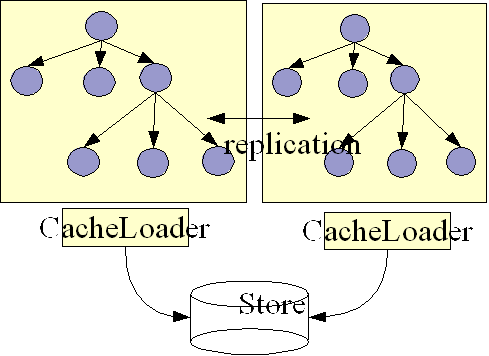
Both nodes have a CacheLoader that accesses a common shared backend store. This could for example be a shared filesystem (using the FileCacheLoader), or a shared database. Because both nodes access the same store, they don't necessarily need state transfer on startup.[7]Rather, theFetchInMemoryState attribute could be set to false, resulting in a 'cold' cache, that gradually warms up as elements are accessed and loaded for the first time. This would mean that individual caches in a cluster might have different in-memory state at any given time (largely depending on their preloading and eviction strategies).
When storing a value, the writer takes care of storing the change in the backend store. For example, if node1 made change C1 and node2 C2, then node1 would tell its CacheLoader to store C1, and node2 would tell its CacheLoader to store C2.
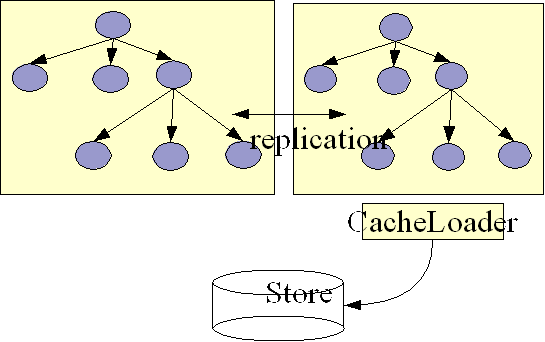
This is a similar case as the previous one, but here only one node in the cluster interacts with a backend store via its CacheLoader. All other nodes perform in-memory replication. A use case for this is HTTP session replication, where all nodes replicate sessions in-memory, and - in addition - one node saves the sessions to a persistent backend store. Note that here it may make sense for the CacheLoader to store changes asynchronously, that is not on the caller's thread, in order not to slow down the cluster by accessing (for example) a database. This is a non-issue when using asynchronous replication.
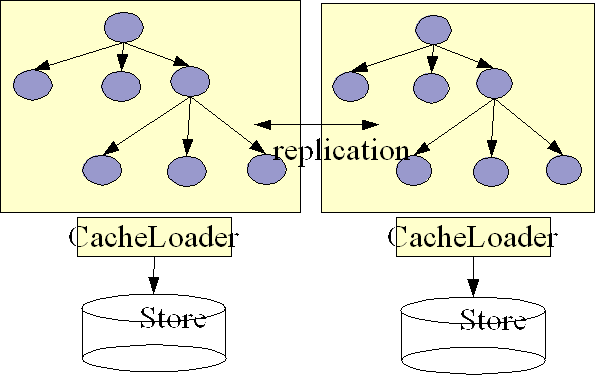
Here, each node has its own datastore. Modifications to the cache are (a) replicated across the cluster and (b) persisted using the CacheLoader. This means that all datastores have exactly the same state. When replicating changes synchronously and in a transaction, the two phase commit protocol takes care that all modifications are replicated and persisted in each datastore, or none is replicated and persisted (atomic updates).
Note that currently JBossCache is not an XAResource, that means it doesn't implement recovery. When used with a TransactionManager that supports recovery, this functionality is not available.
The challenge here is state transfer: when a new node starts it needs to do the following:
Tell the coordinator (oldest node in a cluster) to send it the state
The coordinator then needs to wait until all in-flight transactions have completed. During this time, it will not allow for new transactions to be started.
Then the coordinator asks its CacheLoader for the entire state using loadEntireState(). It then sends back that state to the new node.
The new node then tells its CacheLoader to store that state in its store, overwriting the old state. This is the CacheLoader.storeEntireState() method
As an option, the transient (in-memory) state can be transferred as well during the state transfer.
The new node now has the same state in its backend store as everyone else in the cluster, and modifications received from other nodes will now be persisted using the local CacheLoader.
If you need to set up a hierarchy within a single VM, you can use the LocalDelegatingCacheLoader. This type of hierarchy can currently only be set up programmatically. The code below shows how a first-level cache delegates to a local second-level cache:
TreeCache firstLevel, secondLevel;
LocalDelegatingCacheLoader cache_loader;

// create and configure firstLevel
firstLevel=new TreeCache();

// create and configure secondLevel
secondLevel=new TreeCache();

// create DelegatingCacheLoader
cache_loader=new LocalDelegatingCacheLoader(secondLevel);

// set CacheLoader in firstLevel
firstLevel.setCacheLoader(cache_loader);

// start secondLevel
secondLevel.startService();

// start firstLevel
firstLevel.startService();
If you need to set up a hierarchy across VMs but within a cluster, you can use the RpcDelegatingCacheLoader, which delegates all cache loading requests from non-coordinator caches to the cluster's coordinator cache. The coordinator cache is the first cache in the cluster to come online. Note that if the coordinator cache leaves the cluster for any reason, the second cache in the cluster to come online becomes the coordinator and so on. The XML below shows how to configure a cluster using RpcDelegatingCacheLoader:
<!-- ==================================================================== -->
<!-- Defines TreeCache configuration                                      -->
<!-- ==================================================================== -->

<mbean code="org.jboss.cache.TreeCache" name="jboss.cache:service=TreeCache">
...
<attribute name="CacheLoaderConfiguration">
    <config>
        <passivation>false</passivation>
        <preload>/some/stuff</preload>
        <cacheloader>
            <class>org.jboss.cache.loader.RpcDelegatingCacheLoader</class>
            <!-- whether the cache loader writes are asynchronous -->
            <async>false</async>
            <!-- only one cache loader in the chain may set fetchPersistentState to true.
                 An exception is thrown if more than one cache loader sets this to true. -->
            <fetchPersistentState>false</fetchPersistentState>
            <!-- determines whether this cache loader ignores writes - defaults to false. -->
            <ignoreModifications>false</ignoreModifications>
            <!-- if set to true, purges the contents of this cache loader when the cache starts up.
            Defaults to false.  -->
            <purgeOnStartup>false</purgeOnStartup>
        </cacheloader>
    </config>
</attribute>
...
</mbean>
Note that currently (JBossCache 1.3.0) this cache loader is not well supported, and has not been tested. We suggest to use TcpDelegatingCacheLoader instead (see next).
This cache loader allows to delegate loads and stores to another instance of JBossCache, which could reside (a)in the same address space, (b) in a different process on the same host, or (c) in a different process on a different host. Option (a) is mostly used for unit testing, and the envisaged use is (b) and (c).
A TcpDelegatingCacheLoader talks to a remote TcpCacheServer, which can be a standalone process, or embedded as an MBean inside JBoss. The TcpCacheServer has a reference to another JBossCache, which it can create itself, or which is given to it (e.g. by JBoss, using dependency injection).
The TcpDelegatingCacheLoader is configured with the host and port of the remote TcpCacheServer, and uses this to communicate to it.
An example set of a TcpCacheServer running inside of JBoss is shown below:
<server>

   <classpath codebase="./lib" archives="jboss-cache.jar"/>

   <mbean code="org.jboss.cache.loader.tcp.TcpCacheServer" name="jboss.cache:service=TcpCacheServer">
      <depends optional-attribute-name="Cache"
               proxy-type="attribute">jboss.cache:service=TreeCache</depends>
      <attribute name="BindAddress">${jboss.bind.address:localhost}</attribute>
      <attribute name="Port">7500</attribute>
      <attribute name="MBeanServerName"></attribute>
      <!--<attribute name="CacheName">jboss.cache:service=TreeCache</attribute>-->
   </mbean>

</server>
The BindAddress and Port define where its server socket is listening on, and an existing JBossCache MBean is injected into it (assigned to 'Cache'). This means that all requests from the TcpDelegatingCacheLoader will be received by this instance and forwarded to the JBossCache MBean.
Note that there is also a 'Config' attribute which points to a config XML file for JBossCache. If it is set, then the TcpCacheServer will create its own instance of JBossCache and configure it according to the Config attribute.
The client side looks as follow:
<attribute name="CacheLoaderConfiguration">
   <config>
       <cacheloader>
           <class>org.jboss.cache.loader.tcp.TcpDelegatingCacheLoader</class>
               <properties>
                   host=localhost
                   port=7500
               </properties>
       </cacheloader>
   </config>
</attribute>
This means this instance of JBossCache will delegate all load and store requests to the remote TcpCacheServer running at localhost:7500.
A typical use case could be multiple replicated instance of JBossCache in the same cluster, all delegating to the same TcpCacheServer instance. The TcpCacheServer might itself delegate to a database via JDBCCacheLoader, but the point here is that - if we have 5 nodes all accessing the same dataset - they will load the data from the TcpCacheServer, which has do execute one SQL statement per unloaded data set. If the nodes went directly to the database, then we'd have the same SQL executed multiple times. So TcpCacheServer serves as a natural cache in front of the DB (assuming that a network round trip is faster than a DB access (which usually also include a network round trip)).
To alleviate single point of failure, we could combine this with a ChainingCacheLoader, where the first CacheLoader is a ClusteredCacheLoader, the second a TcpDelegatingCacheLoader, and the last a JDBCacheLoader, effectively defining our cost of access to a cache in increasing order of cost.
Similar to the TcpDelegatingCacheLoader, the RmiDelegatingCacheLoader uses RMI as a method of communicating with a remote cache.
An RmiDelegatingCacheLoader talks to a remote RmiCacheServer, which is a standalone process. The RmiCacheServer has a reference to another JBossCache, which it can create itself, or which is given to it (e.g. by JBoss, using dependency injection).
The RmiDelegatingCacheLoader is configured with the host, port of the remote RMI server and the bind name of the RmiCacheServer, and uses this to communicate.
An example set of an RmiCacheServer running inside of JBoss is shown below:
<server>

	   <classpath codebase="./lib" archives="jboss-cache.jar"/>

	   <mbean code="org.jboss.cache.loader.rmi.RmiCacheServer" name="jboss.cache:service=RmiCacheServer">
	      <depends optional-attribute-name="Cache"
	               proxy-type="attribute">jboss.cache:service=TreeCache</depends>
		  <!-- the address and port of the RMI server. -->
	      <attribute name="BindAddress">${jboss.bind.address:localhost}</attribute>
	      <attribute name="Port">1098</attribute>
		  <attribute name="BindName">MyRmiCacheServer</attribute>
	      <attribute name="MBeanServerName"></attribute>
	      <!--<attribute name="CacheName">jboss.cache:service=TreeCache</attribute>-->
	   </mbean>

	</server>
The BindAddress and Port should point to an already-running RMI server and the BindName is the name the object is bound to in the RMI server. An existing JBossCache MBean is injected into it (assigned to 'Cache'). This means that all requests from the TcpDelegatingCacheLoader will be received by this instance and forwarded to the JBossCache MBean.
Note that there is also a 'Config' attribute which points to a config XML file for JBossCache. If it is set, then the RmiCacheServer will create its own instance of JBossCache and configure it according to the Config attribute.
The client side looks as follow:
<attribute name="CacheLoaderConfiguration">
	   <config>
	       <cacheloader>
	           <class>org.jboss.cache.loader.RmiDelegatingCacheLoader</class>
	               <properties>
	                   host=localhost
	                   port=1098
					   name=MyRmiCacheServer
	               </properties>
	       </cacheloader>
	   </config>
	</attribute>
This means this instance of JBossCache will delegate all load and store requests to the remote RmiCacheServer running as MyRmiCacheServer on an RMI server running on localhost:1098.
Very similar use case scenarios that apply to TcpDelegatingCacheLoaders above apply to RmiDelegatingCacheLoaders as well.
JBossCache is distributed with a JDBC-based CacheLoader implementation that stores/loads nodes' state into a relational database. The implementing class is org.jboss.cache.loader.JDBCCacheLoader.
The current implementation uses just one table. Each row in the table represents one node and contains three columns:
- column for FQN (which is also a primary key column)
- column for node contents (attribute/value pairs)
- column for parent FQN
FQN's are stored as strings. Node content is stored as a BLOB. WARNING: TreeCache does not impose any limitations on the types of objects used in FQN but this implementation of CacheLoader requires FQN to contain only objects of type java.lang.String. Another limitation for FQN is its length. Since FQN is a primary key, its default column type is VARCHAR which can store text values up to some maximum length determined by the database. FQN is also subject to any maximum primary key length restriction imposed by the database.
See http://wiki.jboss.org/wiki/Wiki.jsp?page=JDBCCacheLoader for configuration tips with specific database systems.
Table and column names as well as column types are configurable with the following properties.
- cache.jdbc.table.name - the name of the table. The default value is 'jbosscache'.
- cache.jdbc.table.primarykey - the name of the primary key for the table. The default value is 'jbosscache_pk'.
- cache.jdbc.table.create - can be true or false. Indicates whether to create the table during startup. If true, the table is created if it doesn't already exist. The default value is true.
- cache.jdbc.table.drop - can be true or false. Indicates whether to drop the table during shutdown. The default value is true.
- cache.jdbc.fqn.column - FQN column name. The default value is 'fqn'.
- cache.jdbc.fqn.type - FQN column type. The default value is 'varchar(255)'.
- cache.jdbc.node.column - node contents column name. The default value is 'node'.
- cache.jdbc.node.type - node contents column type. The default value is 'blob'. This type must specify a valid binary data type for the database being used.
If you are using JBossCache in a managed environment (e.g., an application server) you can specify the JNDI name of the DataSource you want to use.
- cache.jdbc.datasource - JNDI name of the DataSource. The default value is 'java:/DefaultDS'.
If you are not using DataSource you have the following properties to configure database access using a JDBC driver.
- cache.jdbc.driver - fully qualified JDBC driver name.
- cache.jdbc.url - URL to connect to the database.
- cache.jdbc.user - user name to connect to the database.
- cache.jdbc.password - password to connect to the database.
Below is an example of a JDBC CacheLoader using Oracle as database. The CacheLoaderConfiguration XML element contains an arbitrary set of properties which define the database-related configuration.
<attribute name="CacheLoaderConfiguration">
    <config>
        <passivation>false</passivation>
        <preload>/some/stuff</preload>
        <cacheloader>
            <class>org.jboss.cache.loader.JDBCCacheLoader</class>
            <!-- same as the old CacheLoaderConfig attribute -->
            <properties>
                cache.jdbc.table.name=jbosscache
                cache.jdbc.table.create=true
                cache.jdbc.table.drop=true
                cache.jdbc.table.primarykey=jbosscache_pk
                cache.jdbc.fqn.column=fqn
                cache.jdbc.fqn.type=varchar(255)
                cache.jdbc.node.column=node
                cache.jdbc.node.type=blob
                cache.jdbc.parent.column=parent
                cache.jdbc.driver=oracle.jdbc.OracleDriver
                cache.jdbc.url=jdbc:oracle:thin:@localhost:1521:JBOSSDB
                cache.jdbc.user=SCOTT
                cache.jdbc.password=TIGER
            </properties>
            <!-- whether the cache loader writes are asynchronous -->
            <async>false</async>
            <!-- only one cache loader in the chain may set fetchPersistentState to true.
                 An exception is thrown if more than one cache loader sets this to true. -->
            <fetchPersistentState>true</fetchPersistentState>
            <!-- determines whether this cache loader ignores writes - defaults to false. -->
            <ignoreModifications>false</ignoreModifications>
            <!-- if set to true, purges the contents of this cache loader when the cache starts up.
            Defaults to false.  -->
            <purgeOnStartup>false</purgeOnStartup>
        </cacheloader>
    </config>
</attribute>
As an alternative to configuring the entire JDBC connection, the name of an existing data source can be given:
<attribute name="CacheLoaderConfiguration">
    <config>
        <passivation>false</passivation>
        <preload>/some/stuff</preload>
        <cacheloader>
            <class>org.jboss.cache.loader.JDBCCacheLoader</class>
            <!-- same as the old CacheLoaderConfig attribute -->
            <properties>
                cache.jdbc.datasource=java:/DefaultDS
            </properties>
            <!-- whether the cache loader writes are asynchronous -->
            <async>false</async>
            <!-- only one cache loader in the chain may set fetchPersistentState to true.
                 An exception is thrown if more than one cache loader sets this to true. -->
            <fetchPersistentState>true</fetchPersistentState>
            <!-- determines whether this cache loader ignores writes - defaults to false. -->
            <ignoreModifications>false</ignoreModifications>
            <!-- if set to true, purges the contents of this cache loader when the cache starts up.
            Defaults to false.  -->
            <purgeOnStartup>false</purgeOnStartup>
        </cacheloader>
    </config>
</attribute>[7] Of course they can enable state transfer, if they want to have a warm or hot cache after startup.
Rather than using standard Java serialization to serialize java.lang.reflect.Method objects and their parameters when remote caches talk to each other to replicate data, JBoss Cache uses its own mechanism to marshall and unmarshall data called the TreeCacheMarshaller.
In addition to providing the performance and efficiency enhancements over standard Java serialization, The TreeCacheMarshaller also performs one other function. In order to deserialize an object replicated to it from a remote cache, a cache instance needs to have access to the classloader that defines the object's class. This is simple if the cache's own classloader can access the required classes, but for situations where JBoss Cache is used as a service supporting clients that use different classloaders, the TreeCacheMarshaller can be configured to use different classloaders on a per-region basis by allowing application code to register a classloader that should be used to handle replication for a portion of the tree.
TreeCache exposes the following basic API for controlling the behavior of TreeCacheMarshaller:
/**
 * Sets whether marshalling uses scoped class loaders on a per region basis.
 *
 * This property must be set to true before any call to
 * {@link #registerClassLoader(String, ClassLoader)} or
 * {@link #activateRegion(String)}
 *
 * @param isTrue
 */
void setUseRegionBasedMarshalling(boolean isTrue);

/**
 * Gets whether marshalling uses scoped class loaders on a per region basis.
 */
boolean getUseRegionBasedMarshalling();

/**
 * Registers the given classloader with TreeCacheMarshaller for
 * use in unmarshalling replicated objects for the specified region.
 *
 * @param fqn The fqn region. This fqn and its children will use this classloader for (un)marshalling.
 * @param cl The class loader to use
 *
 * @throws RegionNameConflictException if fqn is a descendant of
 *                                     an FQN that already has a classloader
 *                                     registered.
 * @throws IllegalStateException if useMarshalling is false
 */
void registerClassLoader(String fqn, ClassLoader cl) throws RegionNameConflictException;

/**
 * Instructs the TreeCacheMarshaller to no longer use a special
 * classloader to unmarshal replicated objects for the specified region.
 *
 * @param fqn The fqn of the root node of region.
 *
 * @throws RegionNotFoundException if no classloader has been registered for
 *                                 fqn.
 * @throws IllegalStateException if useMarshalling is false
 */
void unregisterClassLoader(String fqn) throws RegionNotFoundException;
Property UseRegionBasedMarshalling controls whether classloader-based marshalling should be used. This property should be set as part of normal cache configuration, typically in the cache's XML configuration file:
<attribute name="UseRegionBasedMarshalling">true</attribute>
Anytime after UseRegionBasedMarshalling is set to true, the application code can call registerClassLoader to associate a classloader with the portion of the cache rooted in a particular FQN. Once registered, the classloader will be used to unmarshal any replication traffic related to the node identified by the FQN or to any of its descendants.
At this time, registerClassLoader only supports String-based FQNs.
Note that it is illegal to register a classloader for an FQN that is a descendant of an FQN for which a classloader has already been registered. For example, if classloader X is registered for FQN /a, a RegionNameConflictException will be thrown if an attempt is made to register classloader Y for FQN /a/b.
Method unregisterClassLoader is used to remove the association between a classloader and a particular cache region. Be sure to call this method when you are done using the cache with a particular classloader, or a reference to the classloader will be held, causing a memory leak!
The basic API discussed above is helpful, but in situations where applications with different classloaders are sharing a cache, the lifecycle of those applications will typically be different from that of the cache. The result of this is that it is difficult or impossible to register all required classloaders before a cache is started. For example, consider the following scenario:
- TreeCache on machine A starts.
- On A a classloader is registered under FQN /x.
- Machine B starts, so TreeCache on B starts.
- An object is put in the machine A cache under FQN /x/1.
- Replication to B fails, as the required classloader is not yet registered.
- On B a classloader is registered under FQN /x, but too late to prevent the replication error.
Furthermore, if any objects had been added to server A before server B was started, the initial transfer of state from A to B would have failed as well, as B would not be able to unmarshal the transferred objects.
To resolve this problem, if region-based marshalling is used a cache instance can be configured to ignore replication events for a portion of the tree. That portion of the tree is considered "inactive". After the needed classloader has been registered, the portion of the tree can be "activated". Activation causes the following events to occur:
- Any existing state for that portion of the tree is transferred from another node in the cluster and integrated into the local tree.
- TreeCacheMarshaller begins normal handling of replication traffic related to the portion of the tree.
In addition to the basic marshalling related API discussed above, TreeCache exposes the following API related to activating and inactivating portions of the cache:
/**
 * Sets whether the entire tree is inactive upon startup, only responding
 * to replication messages after {@link #activateRegion(String)} is
 * called to activate one or more parts of the tree.
 * <p>
 * This property is only relevant if {@link #getUseRegionBasedMarshalling()} is
 * true.
 *
 */
public void setInactiveOnStartup(boolean inactiveOnStartup);

/**
 * Gets whether the entire tree is inactive upon startup, only responding
 * to replication messages after {@link #activateRegion(String)} is
 * called to activate one or more parts of the tree.
 * <p>
 * This property is only relevant if {@link #getUseRegionBasedMarshalling()} is
 * true.
 */
public boolean isInactiveOnStartup();

/**
 * Causes the cache to transfer state for the subtree rooted at
 * subtreeFqn and to begin accepting replication messages
 * for that subtree.
 * <p>
 * <strong>NOTE:</strong> This method will cause the creation of a node
 * in the local tree at subtreeFqn whether or not that
 * node exists anywhere else in the cluster.  If the node does not exist
 * elsewhere, the local node will be empty.  The creation of this node will
 * not be replicated.
 *
 * @param subtreeFqn Fqn string indicating the uppermost node in the
 *                   portion of the tree that should be activated.
 *
 * @throws RegionNotEmptyException if the node subtreeFqn
 *                                 exists and has either data or children
 *
 * @throws IllegalStateException
 *       if {@link #getUseRegionBasedMarshalling() useRegionBasedMarshalling} is false
 */
public void activateRegion(String subtreeFqn)
    throws RegionNotEmptyException, RegionNameConflictException, CacheException;

/**
 * Causes the cache to stop accepting replication events for the subtree
 * rooted at subtreeFqn and evict all nodes in that subtree.
 *
 * @param subtreeFqn Fqn string indicating the uppermost node in the
 *                   portion of the tree that should be activated.
 * @throws RegionNameConflictException if subtreeFqn indicates
 *                                     a node that is part of another
 *                                     subtree that is being specially
 *                                     managed (either by activate/inactiveRegion()
 *                                     or by registerClassLoader())
 * @throws CacheException if there is a problem evicting nodes
 *
 * @throws IllegalStateException
 *       if {@link #getUseRegionBasedMarshalling() useRegionBasedMarshalling} is false
 */
public void inactivateRegion(String subtreeFqn) throws RegionNameConflictException, CacheException;
Property InactiveOnStartup controls whether the entire cache should be considered inactive when the cache starts. In most use cases where region activation is needed, this property would be set to true. This property should be set as part of normal cache configuration, typically in the cache's XML configuration file:
<attribute name="InactiveOnStartup">true</attribute>
When InactiveOnStartup is set to true, no state transfer will be performed on startup, even if property FetchInMemoryState is true.
When activateRegion() is invoked, each node in the cluster will be queried to see if it has active state for that portion of the tree. If one does, it will return the current state, which will then be integrated into the tree. Once state is transferred from one node, no other nodes will be asked for state. This process is somewhat different from the initial state transfer process that occurs at startup when property FetchInMemoryState is set to true. During initial state transfer, only the oldest member of the cluster is queried for state. This approach is inadequate for region activation, as it is possible that the oldest member of the cluster also has the region inactivated, and thus cannot provide state. So, each node in the cluster is queried until one provides state.
Before requesting state from other nodes, activateRegion() will confirm that there is no existing data in the portion of the tree being activated. If there is any, a RegionNotEmptyException will be thrown.
It is important to understand that when a region of the tree is marked as inactive, this only means replication traffic from other cluster nodes related to that portion of the tree will be ignored. It is still technically possible for objects to be placed in the inactive portion of the tree locally (via a put call), and any such local activity will be replicated to other nodes. TreeCache will not prevent this kind of local activity on an inactive region, but, as discussed above activateRegion() will throw an exception if it discovers data in a region that is being activated.
As an example of the usage of region activation and inactivation, let's imagine a scenario where a TreeCache instance is deployed as a shared MBean service by deploying a -service.xml in the JBoss /deploy directory. One of the users of this cache could be a web application, which when started will register its classloader with the TreeCache and activate its own region of the cache.
First, the XML configuration file for the shared cache service would be configured as follows (only relevant portions are shown):
<?xml version="1.0" encoding="UTF-8" ?>
<server>
  <classpath codebase="./lib" archives="jboss-cache.jar, jgroups.jar" />

  <!--  ====================================================================  -->
  <!--  Defines TreeCache configuration                                       -->
  <!--  ====================================================================  -->
  <mbean code="org.jboss.cache.TreeCache" name="com.xyz.cache:service=SharedCache">

    .......

    <!-- Configure Marshalling -->
    <attribute name="getUseRegionBasedMarshalling">true</attribute>
    <attribute name="InactiveOnStartup">true</attribute>

    ........

  </mbean>
</server>
For the webapp, registering/unregistering the classloader and activating/inactivating the app's region in the cache are tasks that should be done as part of initialization and destruction of the app. So, using a ServletContextListener to manage these tasks seems logical. Following is an example listener:
package example;

import javax.management.MalformedObjectNameException;
import javax.management.ObjectName;
import javax.servlet.ServletContextEvent;
import javax.servlet.ServletContextListener;

import org.jboss.cache.TreeCacheMBean;
import org.jboss.mx.util.MBeanProxyExt;

public class ActiveInactiveRegionExample implements ServletContextListener
{
   private TreeCacheMBean cache;

   public void contextInitialized(ServletContextEvent arg0) {
      try {
         findCache();

         cache.registerClassLoader("/example", Thread.currentThread().getContextClassLoader());
         cache.activeRegion("/example");
      }
      catch (Exception e) {
         // ... handle exception
      }

   }

   public void contextDestroyed(ServletContextEvent arg0) {
      cache.inactivateRegion("/example");
      cache.unregisterClassLoader("/example");
   }

   private void findCache() throws MalformedObjectNameException {
      // Find the shared cache service in JMX and create a proxy to it
      ObjectName cacheServiceName_ = new ObjectName("com.xyz.cache:service=SharedCache");
      // Create Proxy-Object for this service
      cache = (TreeCacheMBean) MBeanProxyExt.create(TreeCacheMBean.class, cacheServiceName_);
   }
}
The listener makes use of the JBoss utility class MBeanProxyExt to find the TreeCache in JMX and create a proxy to it. (See the "Running and using TreeCache inside JBoss" section below for more on accessing a TreeCache). It then registers its classloader with the cache and activates its region. When the webapp is being destroyed, it inactivates its region and unregisters its classloader (thus ensuring that the classloader isn't leaked via a reference to it held by TreeCacheMarshaller).
Note the order of the method calls in the example class -- register a classloader before activating a region, and inactivate the region before unregistering the classloader.
The activateRegion()/inactivateRegion() API can be used in conjunction with a CacheLoader as well, but only if the cache loader implementation implements interface org.jboss.cache.loader.ExtendedCacheLoader. This is a subinterface of the normal CacheLoader interface. It additionally specifies the following methods needed to support the partial state transfer that occurs when a region is activated:
   /**
    * Fetch a portion of the state for this cache from secondary storage
    * (disk, DB) and return it as a byte buffer.
    * This is for activation of a portion of new cache from a remote cache.
    * The new cache would then call {@link #storeState(byte[], Fqn)}.
    *
    * @param subtree Fqn naming the root (i.e. highest level parent) node of
    *                the subtree for which state is requested.
    *
    * @see org.jboss.cache.TreeCache#activateRegion(String)
    */
   byte[] loadState(Fqn subtree) throws Exception;

   /**
    * Store the given portion of the cache tree's state in secondary storage.
    * Overwrite whatever is currently in secondary storage.
    *
    * @param state   the state to store
    * @param subtree Fqn naming the root (i.e. highest level parent) node of
    *                the subtree included in state.
    */
   void storeState(byte[] state, Fqn subtree) throws Exception;

   /**
    * Sets the {@link RegionManager} this object should use to manage
    * marshalling/unmarshalling of different regions using different
    * classloaders.
    * <p>
    * <strong>NOTE:</strong> This method is only intended to be used
    * by the TreeCache instance this cache loader is
    * associated with.
    * </p>
    *
    * @param manager    the region manager to use, or null.
    */
   void setRegionManager(RegionManager manager);
JBossCache currently comes with two implementations of ExtendedCacheLoader, FileExtendedCacheLoader and JDBCExtendedCacheLoader. These classes extend FileCacheLoader and JDBCCacheLoader, respectively, implementing the extra methods in the extended interface.
To achieve the performance and efficiency gains, the TreeCacheMarshaller uses a number of techniques including method ids for known methods and magic numbers for known internal class types which drastically reduces the size of calls to remote caches, greatly improving throughput and reducing the overhead of Java serialization.
To make things even faster, the TreeCacheMarshaller uses JBoss Serialization, a highly efficient drop-in replacement for Java serialization for user-defined classes. JBoss Serialization is enabled and always used by default, although this can be disabled, causing the marshalling of user-defined classes to revert to Java serialization. JBoss Serialization is disabled by passing in the -Dserialization.jboss=false environment variable into your JVM.
Marshalling in JBoss Cache is now versioned. All communications between caches contain a version short which allows JBoss Cache instances of different versions to communicate with each other. Up until JBoss Cache 1.4.0, all versions were able to communicate with each other anyway since they all used simple serialization of org.jgroups.MethodCall objects, provided they all used the same version of JGroups. This requirement (more a requirement of the JGroups messaging layer than JBoss Cache) still exists, even though with JBoss Cache 1.4.0, we've moved to a much more efficient and sophisticated marshalling mechanism.
JBoss Cache 1.4.0 and future releases of JBoss Cache will always be able to unmarshall data from previous versions of JBoss Cache. For JBoss Cache 1.4.0 and future releases to marshall data in a format that is compatible with older versions, however, you would have to start JBoss Cache with the following configuration attribute:
				<!-- takes values such as 1.2.3, 1.2.4 and 1.3.0 -->
				<attribute name="ReplicationVersion">1.2.4</attribute>
"State Transfer" refers to the process by which a JBoss Cache instance prepares itself to begin providing a service by acquiring the current state from another cache instance and integrating that state into its own state.
The state that is acquired and integrated can consist of two basic types:
"Transient" or "in-memory" state. This consists of the actual in-memory state of another cache instance -- the contents of the various in-memory nodes in the cache that is providing state are serialized and transferred; the recipient deserializes the data, creates corresponding nodes in its own in-memory tree, and populates them with the transferred data.
"In-memory" state transfer is enabled by setting the cache's FetchInMemoryState property to true.
"Persistent" state. Only applicable if a non-shared cache loader is used. The state stored in the state-provider cache's persistent store is deserialized and transferred; the recipient passes the data to its own cache loader, which persists it to the recipient's persistent store.
"Persistent" state transfer is enabled by setting a cache loader's CacheLoaderFetchPersistentState property to true. If multiple cache loaders are configured in a chain, only one can have this property set to true; otherwise you will get an exception at startup.
Persistent state transfer with a shared cache loader does not make sense, as the same persistent store that provides the data will just end up receiving it. Therefore, if a shared cache loader is used, the cache will not allow a persistent state transfer even if a cache loader has CacheLoaderFetchPersistentState set to true.
Which of these types of state transfer is appropriate depends on the usage of the cache.
If a write-through cache loader is used, the current cache state is fully represented by the persistent state. Data may have been evicted from the in-memory state, but it will still be in the persistent store. In this case, if the cache loader is not shared, persistent state transfer is used to ensure the new cache has the correct state. In-memory state can be transferred as well if the desire is to have a "hot" cache -- one that has all relevant data in memory when the cache begins providing service. (Note that the "CacheLoaderPreload" configuration parameter can be used as well to provide a "warm" or "hot" cache without requiring an in-memory state transfer. This approach somewhat reduces the burden on the cache instance providing state, but increases the load on the persistent store on the recipient side.)
If a cache loader is used with passivation, the full representation of the state can only be obtained by combining the in-memory (i.e. non-passivated) and persistent (i.e. passivated) states. Therefore an in-memory state transfer is necesssary. A persistent state transfer is necessary if the cache loader is not shared.
If no cache loader is used and the cache is solely a write-aside cache (i.e. one that is used to cache data that can also be found in a persistent store, e.g. a database), whether or not in-memory state should be transferred depends on whether or not a "hot" cache is desired.
If either in-memory or persistent state transfer is enabled, a full or partial state transfer will be done at various times, depending on how the cache is used. "Full" state transfer refers to the transfer of the state related to the entire tree -- i.e. the root node and all nodes below it. A "partial" state transfer is one where just a portion of the tree is transferred -- i.e. a node at a given Fqn and all nodes below it.
If either in-memory or persistent state transfer is enabled, state transfer will occur at the following times:
Initial state transfer. This occurs when the cache is first started (as part of the processing of the start() method). This is a full state transfer. The state is retrieved from the cache instance that has been operational the longest. If there is any problem receiving or integrating the state, the cache will not start.
Initial state transfer will occur unless:
The cache's InactiveOnStartup property is true. This property is used in conjunction with region-based marshalling; see below for more on this.
Buddy replication is used. See below for more on state transfer with buddy replication.
Partial state transfer following region activation. Only relevant when region-based marshalling is used. Here a special classloader is needed to unmarshal the state for a portion of the tree. State transfer cannot succeed until the application registers this classloader with the cache. Once the application registers its classloader, it calls activateRegion(String fqn). As part of the region activation process, a partial state transfer of the relevant subtree's state is performed. The state is requested from the oldest cache instance in the cluster; if that instance responds with no state, state is requested from each instance one by one until one provides state or all instances have been queried.
Typically when region-based marshalling is used, the cache's InactiveOnStartup property is set to true. This suppresses initial state transfer, which would fail due to the inability to deserialize the transferred state.
Buddy replication. When buddy replication is used, initial state transfer is disabled. Instead, when a cache instance joins the cluster, it becomes the buddy of one or more other instances, and one or more other instances become its buddy. Each time an instance determines it has a new buddy providing backup for it, it pushes it's current state to the new buddy. This "pushing" of state to the new buddy is slightly different from other forms of state transfer, which are based on a "pull" approach (i.e. recipient asks for and receives state). However, the process of preparing and integrating the state is the same.
This "push" of state upon buddy group formation only occurs if the InactiveOnStartup property is set to false. If it is true, state transfer amongst the buddies only occurs when the application calls activateRegion(String fqn) on the various members of the group.
Partial state transfer following an activateRegion() call is slightly different in the buddy replication case as well. Instead of requesting the partial state from one cache instance, and trying all instances until one responds, with buddy replication the instance that is activating a region will request partial state from each instance for which it is serving as a backup.
While this is not absolutely guaranteed, generally speaking within a major version, releases of JBoss Cache are meant to be compatible and interoperable. Compatible in the sense that it should be possible to upgrade an application from one version to another by simply replacing the jars. Interoperable in the sense that if two different versions of JBoss Cache are used in the same cluster, they should be able to exchange replication and state transfer messages. Note however that interoperability requires use of the same JGroups version in all nodes in the cluster. In most cases, the version of JGroups used by a version of JBoss Cache can be upgraded.
In the 1.2.4 and 1.2.4.SP1 releases, API compatibility and interoperability with previous releases was broken. The primary purpose of the 1.2.4.SP2 release was to restore API compatibility and interoperability. Note, however, that restoring API compatibility with earlier releases meant that 1.2.4.SP2 is not completely API compatible with the other two 1.2.4 releases. If you have built applications on top of 1.2.4 or 1.2.4.SP1, please recompile before upgrading to 1.2.4.SP2 in order to be sure you have no issues.
Beginning in 1.2.4.SP2, a new configuration attribute ReplicationVersion has been added. This attribute needs to be set in order to allow interoperability with previous releases. The value should be set to the release name of the version with which interoperability is desired, e.g. "1.2.3". If this attribute is set, the wire format of replication and state transfer messages will conform to that understood by the indicated release. This mechanism allows us to improve JBoss Cache by using more efficient wire formats while still providing a means to preserve interoperability.
In a rare usage scenario, multiple different JBoss Cache instances may be operating on each node in a cluster, but not all need to interoperate with a version 1.2.3 cache, and thus some caches will not be configured with ReplicationVersion set to 1.2.3. This can cause problems with serialization of Fqn objects. If you are using this kind of configuration, are having problems and are unwilling to set ReplicationVersion to 1.2.3 on all caches, a workaround is to set system property jboss.cache.fqn.123compatible to true.
All properties of the cache are configured via setters and can be retrieved via getters. This can be done either manually, or via the PropertyConfigurator and an XML file.
A sample XML configuration file is shown below:
<?xml version="1.0" encoding="UTF-8" ?>
<server>
  <classpath codebase="./lib" archives="jboss-cache.jar, jgroups.jar" />

  <!--  ====================================================================  -->
  <!--  Defines TreeCache configuration                                       -->
  <!--  ====================================================================  -->
  <mbean code="org.jboss.cache.TreeCache" name="jboss.cache:service=TreeCache">
    <depends>jboss:service=Naming</depends>
    <depends>jboss:service=TransactionManager</depends>


    <!-- Configure the TransactionManager -->
    <attribute name="TransactionManagerLookupClass">org.jboss.cache.DummyTransactionManagerLookup</attribute>

	<!--
			Node locking scheme :
								PESSIMISTIC (default)
								OPTIMISTIC
	-->
	<attribute name="NodeLockingScheme">PESSIMISTIC</attribute>

    <!--
            Node locking isolation level :
								 SERIALIZABLE
                                 REPEATABLE_READ (default)
                                 READ_COMMITTED
                                 READ_UNCOMMITTED
                                 NONE

			(ignored if NodeLockingScheme is OPTIMISTIC)
    -->
    <attribute name="IsolationLevel">REPEATABLE_READ</attribute>

    <!--     Valid modes are LOCAL
                             REPL_ASYNC
                             REPL_SYNC
                             INVALIDATION_ASYNC
                             INVALIDATION_SYNC
    -->
    <attribute name="CacheMode">LOCAL</attribute>

    <!--  Whether each interceptor should have an mbean
        registered to capture and display its statistics.  -->
    <attribute name="UseInterceptorMbeans">true</attribute>

    <!-- Name of cluster. Needs to be the same for all clusters, in order
             to find each other -->
    <attribute name="ClusterName">JBoss-Cache-Cluster</attribute>

    <attribute name="ClusterConfig">
      <config>
        <!-- UDP: if you have a multihomed machine,
                set the bind_addr attribute to the appropriate NIC IP address
        -->
        <!-- UDP: On Windows machines, because of the media sense feature
                 being broken with multicast (even after disabling media sense)
                 set the loopback attribute to true
        -->
        <UDP mcast_addr="228.1.2.3" mcast_port="45566" ip_ttl="64" ip_mcast="true"
           mcast_send_buf_size="150000" mcast_recv_buf_size="80000" ucast_send_buf_size="150000"
           ucast_recv_buf_size="80000" loopback="false" />
        <PING timeout="2000" num_initial_members="3" up_thread="false" down_thread="false" />
        <MERGE2 min_interval="10000" max_interval="20000" />
        <FD shun="true" up_thread="true" down_thread="true" />
        <VERIFY_SUSPECT timeout="1500" up_thread="false" down_thread="false" />
        <pbcast.NAKACK gc_lag="50" max_xmit_size="8192" retransmit_timeout="600,1200,2400,4800" up_thread="false"
           down_thread="false" />
        <UNICAST timeout="600,1200,2400" window_size="100" min_threshold="10" down_thread="false" />
        <pbcast.STABLE desired_avg_gossip="20000" up_thread="false" down_thread="false" />
        <FRAG frag_size="8192" down_thread="false" up_thread="false" />
        <pbcast.GMS join_timeout="5000" join_retry_timeout="2000" shun="true" print_local_addr="true" />
        <pbcast.STATE_TRANSFER up_thread="false" down_thread="false" />
      </config>
    </attribute>

    <!--    The max amount of time (in milliseconds) we wait until the
            initial state (ie. the contents of the cache) are retrieved from
            existing members in a clustered environment
    -->
    <attribute name="InitialStateRetrievalTimeout">5000</attribute>

    <!--    Number of milliseconds to wait until all responses for a
            synchronous call have been received.
    -->
    <attribute name="SyncReplTimeout">10000</attribute>

    <!--  Max number of milliseconds to wait for a lock acquisition -->
    <attribute name="LockAcquisitionTimeout">15000</attribute>

    <!--  Name of the eviction policy class. -->
    <attribute name="EvictionPolicyClass">org.jboss.cache.eviction.LRUPolicy</attribute>

    <!--  Specific eviction policy configurations. This is LRU -->
    <attribute name="EvictionPolicyConfig">
      <config>
        <attribute name="wakeUpIntervalSeconds">5</attribute>
        <!--  Cache wide default -->
        <region name="/_default_">
         <attribute name="maxNodes">5000</attribute>
         <attribute name="timeToLiveSeconds">1000</attribute>
         <!-- Maximum time an object is kept in cache regardless of idle time -->
         <attribute name="maxAgeSeconds">120</attribute>
       </region>

       <region name="/org/jboss/data">
         <attribute name="maxNodes">5000</attribute>
         <attribute name="timeToLiveSeconds">1000</attribute>
       </region>

       <region name="/org/jboss/test/data">
         <attribute name="maxNodes">5</attribute>
         <attribute name="timeToLiveSeconds">4</attribute>
       </region>
      </config>
    </attribute>

        <!-- New 1.3.x cache loader config block -->
        <attribute name="CacheLoaderConfiguration">
            <config>
                <!-- if passivation is true, only the first cache loader is used; the rest are ignored -->
                <passivation>false</passivation>
                <preload>/a/b, /allTempObjects, /some/specific/fqn</preload>
                <shared>false</shared>

                <!-- we can now have multiple cache loaders, which get chained -->
                <cacheloader>
                    <class>org.jboss.cache.loader.FileCacheLoader</class>
                    <!-- same as the old CacheLoaderConfig attribute -->
                    <properties>
                        location=/tmp/myFileStore
                    </properties>
                    <!-- whether the cache loader writes are asynchronous -->
                    <async>false</async>
                    <!-- only one cache loader in the chain may set fetchPersistentState to true.
                        An exception is thrown if more than one cache loader sets this to true. -->
                    <fetchPersistentState>true</fetchPersistentState>
                    <!-- determines whether this cache loader ignores writes - defaults to false. -->
                    <ignoreModifications>false</ignoreModifications>
                    <!-- if set to true, purges the contents of this cache loader when the cache starts up.
                    Defaults to false.  -->
                    <purgeOnStartup>false</purgeOnStartup>
                </cacheloader>

                <cacheloader>
                    <class>org.jboss.cache.loader.JDBCCacheLoader</class>
                    <!-- same as the old CacheLoaderConfig attribute -->
                    <properties>
                        cache.jdbc.driver=com.mysql.jdbc.Driver
                        cache.jdbc.url=jdbc:mysql://localhost:3306/jbossdb
                        cache.jdbc.user=root
                        cache.jdbc.password=
                    </properties>
                    <!-- whether the cache loader writes are asynchronous -->
                    <async>true</async>
                    <!-- only one cache loader in the chain may set fetchPersistentState to true.
                        An exception is thrown if more than one cache loader sets this to true. -->
                    <fetchPersistentState>false</fetchPersistentState>
                    <!-- determines whether this cache loader ignores writes - defaults to false. -->
                    <ignoreModifications>true</ignoreModifications>
                    <!-- if set to true, purges the contents of this cache loader when the cache starts up.
                    Defaults to false.  -->
                    <purgeOnStartup>false</purgeOnStartup>
                </cacheloader>

            </config>
        </attribute>


  </mbean>
</server>
The PropertyConfigurator.configure() method needs to have as argument a filename which is located on the classpath; it will use be used to configure JBoss Cache from the properties defined in it. Note that this configuration file is used to configure JBoss Cache both as a standalone cache, and as an MBean if run inside the JBoss container.[8]
A list of definitions of each of the XML attributes used above:
Name | Description |
BuddyReplicationConfig | An XML element that contains detailed buddy replication configuration. See section above on Buddy Replication. |
CacheLoaderConfiguration | An XML element that contains detailed cache loader configuration. See section above on Cache Loaders. |
CacheMode | LOCAL, REPL_SYNC, REPL_ASYNC, INVALIDATION_SYNC or INVALIDATION_ASYNC |
ClusterName | Name of cluster. Needs to be the same for all nodes in a cluster in order to find each other. |
ClusterConfig | The configuration of the underlying JGroups stack. See cluster-service.xml for an example. |
EvictionPolicyClass | The name of a class implementing EvictionPolicy. If empty, no eviction policy is enabled. |
EvictionPolicyConfig | Configuration parameter for the specified eviction policy. Note that the content is provider specific. |
FetchInMemoryState (renamed from FetchStateOnStartup) | Whether or not to acquire the initial in-memory state from existing members. Allows for warm/hot caches (true/false). Also see the fetchPersistentState element in CacheLoaderConfiguration. |
InitialStateRetrievalTimeout | Time in milliseconds to wait for initial state retrieval. This should be longer than LockAcquisitionTimeout as the node providing state may need to wait that long to acquire necessary read locks on the cache. |
InactiveOnStartup | Whether or not the entire tree is inactive upon startup, only responding to replication messages after activateRegion() is called to activate one or more parts of the tree. If true, property FetchInMemoryState is ignored. This property should only be set to true if UseRegionBasedMarshalling is also true. |
NodeLockingScheme | May be PESSIMISTIC (default) or OPTIMISTIC. See documentation on Transactions and Concurrency for more details. |
IsolationLevel | Node locking isolation level : SERIALIZABLE, REPEATABLE_READ (default), READ_COMMITTED, READ_UNCOMMITTED, and NONE. Note that this is ignored if NodeLockingScheme is OPTIMISTIC. Case doesn't matter. See documentation on Transactions and Concurrency for more details. |
LockAcquisitionTimeout | Time in milliseconds to wait for a lock to be acquired. If a lock cannot be acquired an exception will be thrown. |
ReplicationVersion | Tells the cache to serialize replication traffic in a format consistent with that used by the given release of JBoss Cache. Different JBoss Cache versions use different wire formats; setting this attribute tells a cache from a later release to serialize data using the format from an earlier release. This allows caches from different releases to interoperate. For example, a 1.2.4.SP2 cache could have this value set to "1.2.3", allowing it to interoperate with a 1.2.3 cache. Valid values are a dot-separated release number, with any SP qualifer also separated by a dot, e.g. "1.2.3" or "1.2.4.SP2". |
ReplQueueInterval | Time in milliseconds for elements from the replication queue to be replicated. |
SyncReplTimeout | For synchronous replication: time in milliseconds to wait until replication acks have been received from all nodes in the cluster. |
ReplQueueMaxElements | Max number of elements in the replication queue until replication kicks in. |
StateTransferVersion | The binary format to use for state transfer data. Different releases of JBossCache use different formats; if this attribute is set a later release will use an earlier release's format, allowing interoperability. Valid values are "124" for JBossCache 1.2.4, "130" for release 1.3.0, etc. Earliest valid version is 124. |
TransactionManagerLookupClass | The fully qualified name of a class implementing TransactionManagerLookup. Default is JBossTransactionManagerLookup. There is also an option of DummyTransactionManagerLookup for example. |
UseInterceptorMbeans | Specifies whether each interceptor should have an associated mbean registered. Interceptor mbeans are used to capture and display statistics. This setting enables or disables all such interceptor mbeans. Default value is true. |
UseRegionBasedMarshalling | When unmarshalling replicated data, this option specifies whether or not to use different classloaders (for different cache regions). This defaults to false if unspecified. |
UseReplQueue | For asynchronous replication: whether or not to use a replication queue (true/false). |
As of JBoss Cache 1.3.0, a new API has been introduced, to allow you to override certain behaviour of the cache on a per invocation basis. This involves creating an instance of org.jboss.cache.config.Option, setting the options you wish to override on the Option object and passing it in as a parameter to overloaded versions of get(), put() and remove(). See the javadocs on the Option class for details on these options.
JBoss Cache includes JMX MBeans to expose cache functionality and provide statistics that can be used to analyze cache operations. JBoss Cache can also broadcast cache events as MBean notifications for handling via JMX monitoring tools.
JBoss Cache provides an MBean that allows JMX access to a cache instance. This MBean is accessible from an MBean server through the service name specified in the cache instance's configuration. For example, the Tomcat clustering cache instance is accessible through the service named "jboss.cache:service=TomcatClusteringCache." This MBean can be used to perform most cache operations via JMX.
JBoss Cache also provides MBeans for each interceptor configured in the cache's interceptor stack. These MBeans are used to capture and expose statistics related to cache operations. They are hierarchically associated with the cache's primary MBean and have service names that reflect this relationship. For example, a replication interceptor MBean for the TomcatClusteringCache instance will be accessible through the service named "jboss.cache:service=TomcatClusteringCache,treecache-interceptor=ReplicationInterceptor."
JBoss Cache captures statistics in its interceptors and exposes the statistics through interceptor MBeans. Cache interceptor MBeans are enabled by default; these MBeans can be disabled for a specific cache instance through the UseInterceptorMbeans attribute. See the Configuration chapter for further details on configuration of this attribute.
Each interceptor's MBean provides an attribute that can be used to disable maintenance of statistics for that interceptor. Note that the majority of the statistics are provided by the CacheMgmtInterceptor MBean so this interceptor is the most significant in this regard. If you want to disable all statistics for performance reasons, you should utilize the UseInterceptorMbeans configuration setting as this will prevent the CacheMgmtInterceptor from being included in the cache's interceptor stack when the cache is started.
Each interceptor provides the following common operations and attributes.
- dumpStatistics - returns a Map containing the interceptor's attributes and values.
- resetStatistics - resets all statistics maintained by the interceptor.
- setStatisticsEnabled(boolean) - allows statistics to be disabled for a specific interceptor.
The following table describes the statistics currently available for JBoss Cache.
Table 12.1. JBoss Cache Management Statistics
| MBean Name | Attribute | Type | Description |
|---|---|---|---|
| ActivationInterceptor | Activations | long | Number of passivated nodes that have been activated. |
| CacheLoaderInterceptor | CacheLoaderLoads | long | Number of nodes loaded through a cache loader. |
| CacheLoaderInterceptor | CacheLoaderMisses | long | Number of unsuccessful attempts to load a node through a cache loader. |
| CacheMgmtInterceptor | Hits | long | Number of successful attribute retrievals. |
| CacheMgmtInterceptor | Misses | long | Number of unsuccessful attribute retrievals. |
| CacheMgmtInterceptor | Stores | long | Number of attribute store operations. |
| CacheMgmtInterceptor | Evictions | long | Number of node evictions. |
| CacheMgmtInterceptor | NumberOfAttributes | int | Number of attributes currently cached. |
| CacheMgmtInterceptor | NumberOfNodes | int | Number of nodes currently cached. |
| CacheMgmtInterceptor | ElapsedTime | long | Number of seconds that the cache has been running. |
| CacheMgmtInterceptor | TimeSinceReset | long | Number of seconds since the cache statistics have been reset. |
| CacheMgmtInterceptor | AverageReadTime | long | Average time in milliseconds to retrieve a cache attribute, including unsuccessful attribute retrievals. |
| CacheMgmtInterceptor | AverageWriteTime | long | Average time in milliseconds to write a cache attribute. |
| CacheMgmtInterceptor | HitMissRatio | double | Ratio of hits to hits and misses. A hit is a get attribute operation that results in an object being returned to the client. The retrieval may be from a cache loader if the entry isn't in the local cache. |
| CacheMgmtInterceptor | ReadWriteRatio | double | Ratio of read operations to write operations. This is the ratio of cache hits and misses to cache stores. |
| CacheStoreInterceptor | CacheLoaderStores | long | Number of nodes written to the cache loader. |
| InvalidationInterceptor | Invalidations | long | Number of cached nodes that have been invalidated. |
| PassivationInterceptor | Passivations | long | Number of cached nodes that have been passivated. |
| TxInterceptor | Prepares | long | Number of transaction prepare operations performed by this interceptor. |
| TxInterceptor | Commits | long | Number of transaction commit operations performed by this interceptor. |
| TxInterceptor | Rollbacks | long | Number of transaction rollbacks operations performed by this interceptor. |
JBoss Cache users can register a listener to receive cache events as described in the Eviction Policies chapter. Users can alternatively utilize the cache's management information infrastructure to receive these events via JMX notifications. Cache events are accessible as notifications by registering a NotificationListener for the CacheMgmtInterceptor MBean. This functionality is only available if cache statistics are enabled as described in the previous section.
The following table depicts the JMX notifications available for JBoss Cache as well as the cache events to which they correspond. These are the notifications that can be received through the CacheMgmtInterceptor MBean. Each notification represents a single event published by JBoss Cache and provides user data corresponding to the parameters of the event.
Table 12.2. JBoss Cache MBean Notifications
| Notification Type | Notification Data | TreeCacheListener Event | |||
|---|---|---|---|---|---|
| org.jboss.cache.CacheStarted | String : cache service name | cacheStarted | |||
| org.jboss.cache.CacheStopped | String : cache service name | cacheStopped | |||
| org.jboss.cache.NodeCreated | String : fqn | NodeCreated | |||
| org.jboss.cache.NodeEvicted | String : fqn | NodeEvicted | |||
| org.jboss.cache.NodeLoaded | String : fqn | NodeLoaded | |||
| org.jboss.cache.NodeModifed | String : fqn | NodeModifed | |||
| org.jboss.cache.NodeRemoved | String : fqn | NodeRemoved | |||
| org.jboss.cache.NodeVisited | String : fqn | NodeVisited | |||
| org.jboss.cache.ViewChange | String : view | ViewChange | |||
| org.jboss.cache.NodeActivate |
| NodeActivate | |||
| org.jboss.cache.NodeEvict |
| NodeEvict | |||
| org.jboss.cache.NodeModify |
| NodeModify | |||
| org.jboss.cache.NodePassivate |
| NodePassivate | |||
| org.jboss.cache.NodeRemove |
| NodeRemove |
The following is an example of how to programmatically receive cache notifications when running in a JBoss application server environment. In this example, the client uses a filter to specify which events are of interest.
MyListener listener = new MyListener();
NotificationFilterSupport filter = null;

// get reference to MBean server
Context ic = new InitialContext();
MBeanServerConnection server = (MBeanServerConnection)ic.lookup("jmx/invoker/RMIAdaptor");

// get reference to CacheMgmtInterceptor MBean
String cache_service = "jboss.cache:service=TomcatClusteringCache";
String mgmt_service = cache_service + ",treecache-interceptor=CacheMgmtInterceptor";
ObjectName mgmt_name = new ObjectName(mgmt_service);

// configure a filter to only receive node created and removed events
filter = new NotificationFilterSupport();
filter.disableAllTypes();
filter.enableType(CacheMgmtInterceptor.NOTIF_NODE_CREATED);
filter.enableType(CacheMgmtInterceptor.NOTIF_NODE_REMOVED);

// register the listener with a filter
// leave the filter null to receive all cache events
server.addNotificationListener(mgmt_name, listener, filter, null);

// ...

// on completion of processing, unregister the listener
server.removeNotificationListener(mgmt_name, listener, filter, null);
The following is the simple notification listener implementation used in the previous example.
private class MyListener implements NotificationListener, Serializable {
   public void handleNotification(Notification notification, Object handback) {
      String message = notification.getMessage();
      String type = notification.getType();
      Object userData = notification.getUserData();
      System.out.println(type + ": "+message);
      if (userData == null) {
         System.out.println("notification data is null");
      }
      else if (userData instanceof String) {
         System.out.println("notification data: "+(String)userData);
      }
      else if (userData instanceof Object[]) {
         Object[] ud = (Object[])userData;
         for (int i = 0; i > ud.length; i++) {
            System.out.println("notification data: "+ud[i].toString());
         }
      }
      else {
         System.out.println("notification data class: " + userData.getClass().getName());
      }
   }
}
Note: the JBoss Cache management implementation only listens to cache events after a client registers to receive MBean notifications. As soon as no clients are registered for notifications, the MBean will remove itself as a cache listener.
JBoss Cache MBeans are readily accessed when running cache instances in an application server that provides an MBean server interface such as JBoss JMX Console. Refer to server documentation for instructions on how to access MBeans running in a server's MBean container.
JBoss Cache MBeans are also accessible when running in a non-server environment if the JVM is JDK 5.0 or later. When running a standalone cache in a JDK 5 environment, you can access the cache's MBeans as follows.
- Set the system property -Dcom.sun.management.jmxremote when starting the JVM where the cache will run.
- Once the JVM is running, start the JDK 5 jconsole utility, located in the JDK's /bin directory.
- When the utility loads, you will be able to select your JVM and connect to it. The JBoss Cache MBeans will be available on the MBeans panel.
Note: The jconsole utility will automatically register as a listener for cache notifications when connected to a JVM running JBoss Cache instances.
The following figure shows cache interceptor MBeans in jconsole. Cache statistics are displayed for the CacheMgmt interceptor:
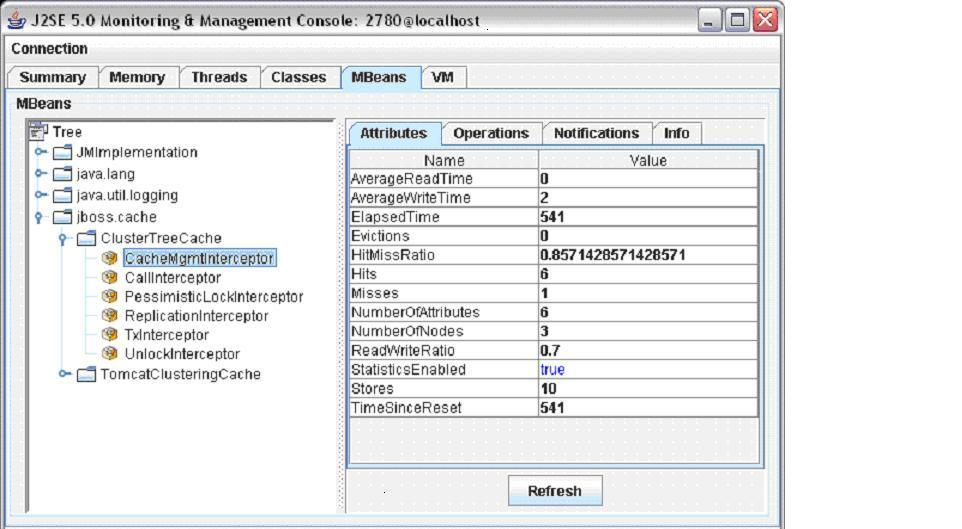
If JBoss Cache is run in JBoss AS then JBoss Cache can be deployed as an MBean. The steps below illustrate how to do this. We do not deploy JBoss Cache as a Service Archive (SAR), but as a JAR (jboss-cache.jar in the lib directory) and an XML file defining the MBean. Of course, JBoss Cache can also be deployed as a SAR, or even as part of a WAR, EJB or EAR.
First, the jboss-cache.jar file has to be copied to the /lib directory and JBoss AS has to be restarted. Then a regular JBoss Cache configuration file in XML format has to be copied to the /deploy directory. The XML file format is the same as discussed in the Configuration chapter.
In order to be used from a client such as a servlet in the Tomcat web container inside the same JBoss container, JMX can be used:
MBeanServer server=MBeanServerLocator.locateJBoss();
TreeCacheMBean cache;
cache=(TreeCacheMBean)MBeanProxyExt.create(TreeCacheMBean.class, "jboss.cache:service=TreeCache", server);
cache.put("/a/b/c", null);
The MBeanServerLocator class is a helper to find the (only) JBoss MBean server inside the current VM. The static create() method creates a dynamic proxy to the given interface and uses JMX to dynamically dispatch methods invoked against the generated interface. The name used to look up the MBean is the same as defined in the configuration file.
If JBoss Cache is run inside of JBoss AS (as an MBean), we can bind it into JNDI using JrmpProxyFactory, just like any other MBean. Below is an example of how to do this:
 <mbean
      code="org.jboss.invocation.jrmp.server.JRMPProxyFactory"
      name="mydomain:service=proxyFactory,type=jrmp,target=factory">
      <attribute
      name="InvokerName">jboss:service=invoker,type=jrmp</attribute>
      <attribute
      name="TargetName">jboss.cache:service=TreeCache</attribute>
      <attribute name="JndiName">MyCache</attribute> <attribute
      name="InvokeTargetMethod">true</attribute> <attribute
      name="ExportedInterface">org.jboss.cache.TreeCacheMBean</attribute>
      <attribute name="ClientInterceptors"> <iterceptors>
      <interceptor>org.jboss.proxy.ClientMethodInterceptor</interceptor>
      <interceptor>org.jboss.proxy.SecurityInterceptor</interceptor>
      <interceptor>org.jboss.invocation.InvokerInterceptor</interceptor>
      </iterceptors> </attribute>
      <depends>jboss:service=invoker,type=jrmp</depends>
      <depends>jboss.cache:service=TreeCache</depends>
      </mbean>
The InvokerName attribute needs to point to a valid JBoss invoker MBean. TargetName is the JMX name of the MBean that needs to be bound into JNDI. JndiName is the name under which the MBean will be bound, and ExportedInterface is the interface name of the MBean.